Sophos Alerts
Filter and sort the alerts Sophos Central raised across all your organizations, by severity, type and device.
What the page is for
Sophos Alerts is a page in the Lavawall® console, in the Integrations area. Lavawall is the RMM, security, and compliance platform from ThreeShield, built and hosted in Canada. About this feature.
This page lists alerts reported by Sophos Central for your linked Sophos organizations, as of the last Sophos sync. Each alert shows its ID, organization, type and sub-type, severity, the computer or firewall involved, and when it was raised.
Use it to look across every Sophos tenant at once, for example to see all high-severity alerts from the past week, or everything raised on one firewall. The list starts filtered to the Sophos organizations linked to the company selected at the top of the console.
What you see
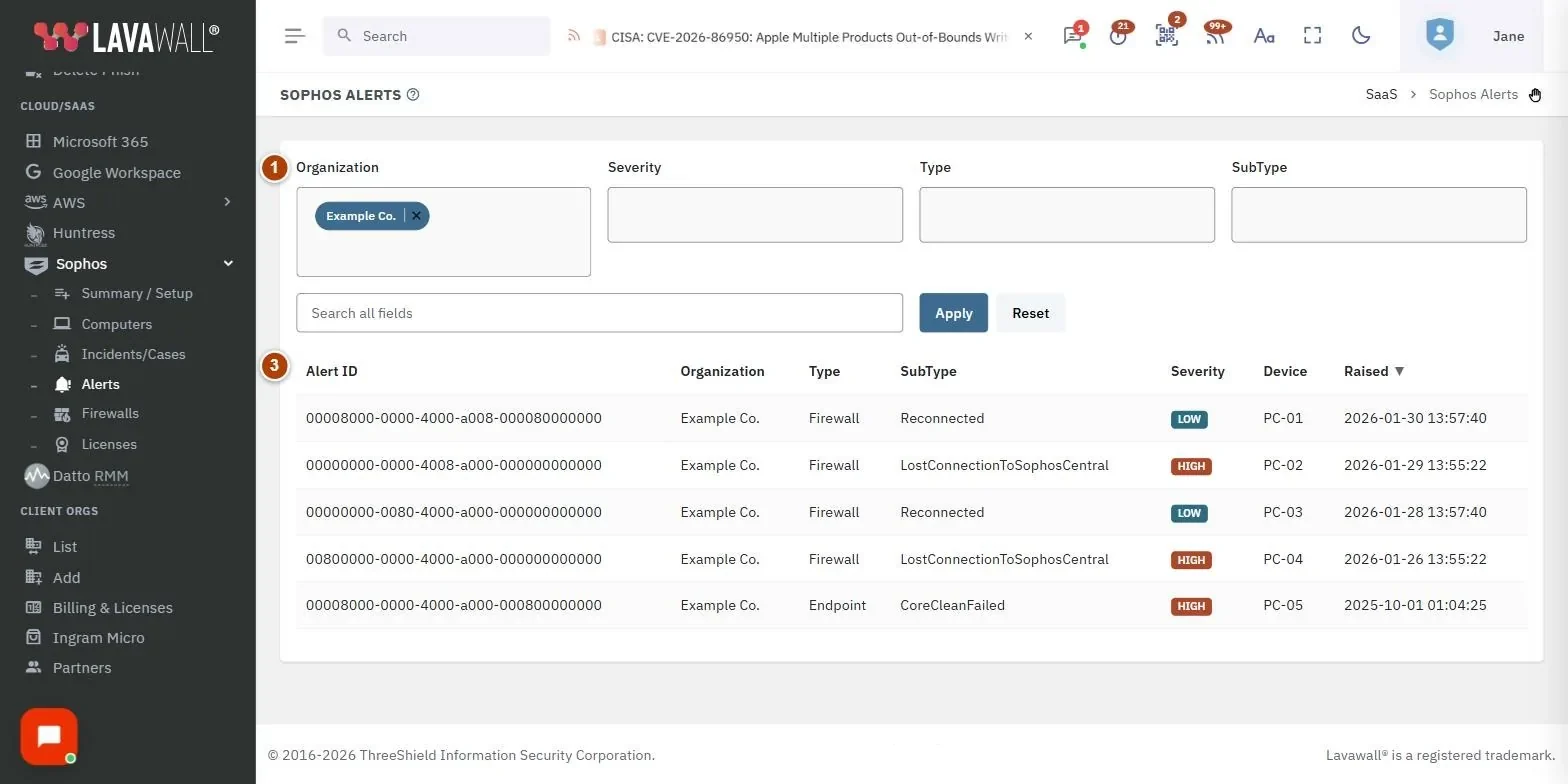
- Filters: Organization, Severity, Type and SubType multi-select boxes.
- Search and buttons: Search all fields, Apply and Reset.
- Alerts table: Alert ID, Organization, Type, SubType, Severity, Device and Raised.
How to see the most serious alerts
- Choose critical and high in Severity.
- Click Apply.
- Alerts are sorted newest first by Raised. Click Severity to sort by severity instead.
How to filter by alert type
- Choose one or more values in Type, and optionally in SubType.
- Click Apply.
How to search and reset
- Type part of an alert ID, description, device name or status in Search all fields and click Apply.
- Click Reset to clear all filters.
Tips
- Severity badges: critical and high are red, medium is amber, low is blue, informational is grey.
- Click the Alerts (Open) number on Sophos Firewalls to open this page for that firewall's organization.
- Clicking a column heading sorts by it; click again to reverse.
- The search also matches the alert description, even though the description is not shown as a column.
Troubleshooting
- No alerts are listed.
- Run a Sophos sync on Sophos Summary and Setup and check that the Sophos organization is linked to the company selected at the top of the console.
- The list stops at 1,000 alerts.
- Narrow it with the filters or a search.
- The device column shows an ID.
- Sophos did not report a matching computer or firewall for that alert in the last sync.
Task guides that use this page
Related articles
Still need help?
Search the support centre, or contact our support team and tell us which page you were on:
- Chat now: use the chat button in the bottom-right corner of this page to reach our team right away. Where cookie consent is needed, the chat starts after you accept (cookie settings).
- Email: send our support team a message through the contact page. It goes straight to a person.
- Phone:
 AB: 1-403-538-5053
 US: 1-406-988-7333
 UK: +44 20 3695 9786
Names, companies, devices and figures in the pictures are examples. Other product and company names are trademarks of their respective owners.