Vendor Inventory
A vendor inventory that builds itself.
Lavawall® fills in your vendor inventory for you. The first time you open it, it is already populated from the security and IT data you collect and the SaaS apps Lavawall detects from user email and activity. That matters, because the vendor spreadsheet nobody has time to maintain is the one the auditor always asks for.
From there, a plain-language interview walks you through each vendor. No jargon, no login for the people you ask, just simple questions anyone on your team can answer.
Start with the GRC Wizard See the full GRC platform
Auto-populated · guided plain-language reviews · owner from real users · shadow-IT discovery
See it in the Lavawall® console
Real screens, shown with example data.
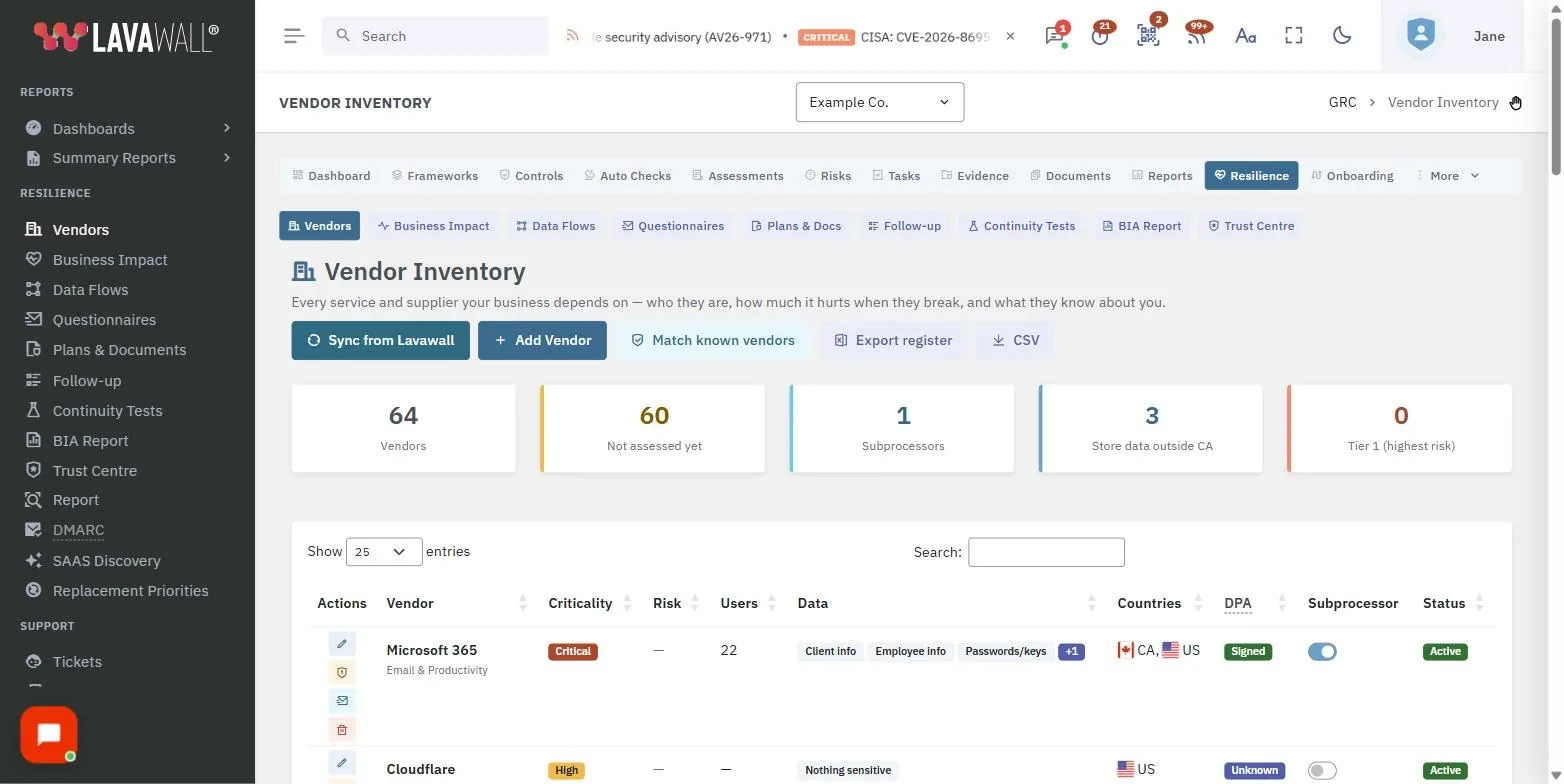
It starts full, not empty
Every other vendor management tool hands you a blank grid and a homework assignment. Lavawall does the opposite. Two ideas drive it: it uses the security and IT data you already collect, and it asks questions in plain language that anyone can answer without a login or a glossary.
Auto-populated from day one
Open the inventory and your vendors are already there, drawn from your connected security and IT tools and from SaaS discovery based on the apps Lavawall detects from user email and activity. The blank page is gone.
A quick guided interview per vendor
Assess each one with plain questions: how much you depend on it, what data it holds, where that data is stored, and what you would do if it went down. No risk-scoring math to learn, no security jargon to decode.
The owner is a real user
Because Lavawall sees who is actually active in each tool, you pick the relationship owner from the people genuinely using it. The person closest to the vendor owns it, instead of an assignment that quietly went stale.
Know where the data lives
Capture what data each vendor holds and where it is stored, so a data-residency or privacy question has an answer already on file rather than a scramble across departments.
A downtime plan for each one
Record what you would do if a vendor went down. The plan feeds straight into your Business Impact Assessment, so continuity planning and vendor risk stay in sync.
The tools roundup finds what you missed
Shadow IT is the vendor risk you can't see. One “tools roundup” email survey asks your team what apps they actually use, and turns the answers into vendor entries automatically.
People sign up for apps that IT never approved. The tools roundup surfaces them in your team's own words, then Lavawall adds each newly discovered app to your inventory as a vendor ready to assess. The apps you didn't know were in use stop being a blind spot and become tracked entries with owners and data notes.
Part of the wider GRC platform
Business Impact Assessment
The downtime plan you record for each vendor flows into a plain-language BIA with recovery targets and a heatmap.
Understand your dependencies →GRC & compliance
Vendor records feed your framework mapping and evidence, so third-party risk is covered where auditors look.
Learn more →GRC Wizard
The plain-language wizard that runs vendor reviews, your BIA, and compliance mapping end to end.
Open the wizard →Vendor risk management
175+ common SaaS, Microsoft 365, and Google Workspace apps arrive with their SOC 2, ISO 27001, DPA, and subprocessors pre-filled, and attestation questionnaires go out in a click for the rest.
See the pre-filled library →Common questions
- How does the vendor inventory populate itself?
- The first time you open it, Lavawall auto-populates your vendors from your existing security and IT tools and its SaaS discovery, based on the apps it detects from user email and activity. You start with a real list instead of a blank spreadsheet.
- How do I assess each vendor?
- A quick guided interview asks plain-language questions: how much you depend on the vendor, what data it holds, where that data is stored, and what you would do if it went down. No jargon and no security background required.
- What is the tools roundup survey?
- A single email survey to your team that surfaces the SaaS apps people actually use, including ones IT never approved. Lavawall turns the responses into new vendor entries automatically.
- Who gets assigned as the relationship owner?
- You pick the owner from the people who actually use the tool, since Lavawall already sees who is active in each app. The person closest to the vendor owns the relationship.
- Do I have to enter vendors manually?
- Rarely. Most appear on their own from your connected tools and SaaS discovery. You can still add one by hand, but the inventory maintains itself as the apps you use change.