Password vault
A password manager your MSP already runs.
The Lavawall® password manager is built into the console that manages the endpoint, so retiring a device or closing an offboarding ticket takes the credential with it. Everything is encrypted in your browser, which means we only ever store ciphertext.
See it in the Lavawall® console
Real screens, shown with example data.
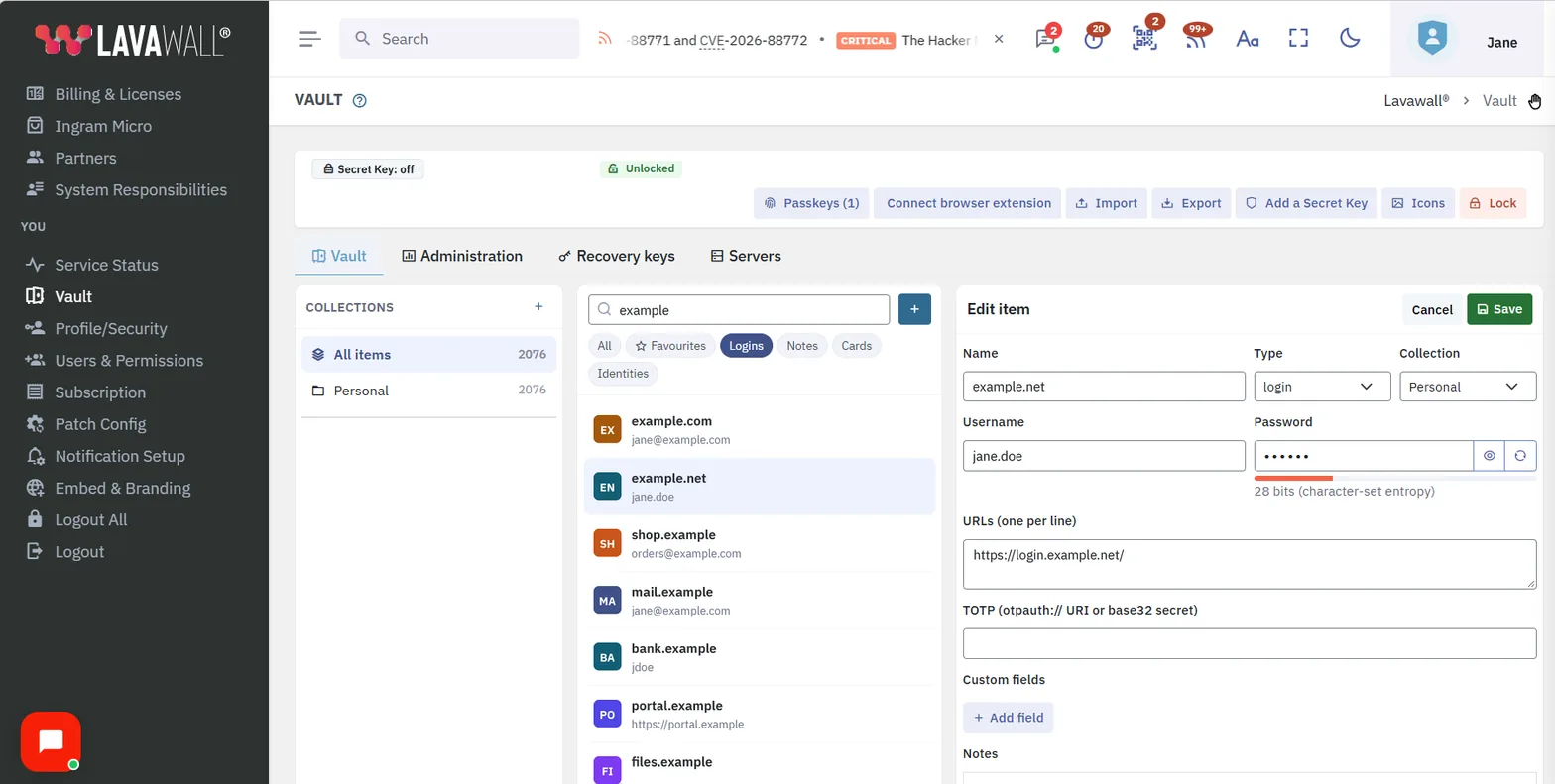
We store ciphertext, not passwords
Your vault is encrypted on your device before any of it reaches us. Passwords, usernames, secure notes, one-time-code seeds, SSH keys, and card numbers are all ciphertext by the time they hit our servers. So are the things most vaults leave in the clear: the website addresses, and even the names of your folders. There is no column in our database that holds a site, a host, a tag, or a search index, because none of that is sent to us.
The practical version: an administrator with full access to the production database, the server logs, and the disks sees encrypted blobs and nothing to read them with. Encryption in the browser is the whole design, so there is no setting to forget.
Built where your endpoints already live
A standalone password manager knows your logins. It does not know that a laptop was retired last night, or that a technician was offboarded this morning. Tying the two together means connecting two separate products.
Lavawall’s vault is a module in the console that runs your patching, your remote support, and your compliance. Deprovisioning is a console action: when a device is retired or a person is offboarded in Lavawall, their access to the vault goes with it. Shared credentials live in organization-owned collections from the start, so a departing employee’s access is removed by rotating a collection instead of seizing a personal vault after the fact.
The same vault holds the secrets your automation needs. A password or token a script uses is kept as a secret variable on the Script secrets tab, sealed in your browser, and opened only on the computers you allow, just before the script runs (Windows computers). The access key for your own backup storage bucket can be kept there too, locked to the backup relays that use it. See scripting and Lavawall Backup.
How the encryption works
Your passphrase never leaves your device. It is stretched into a master key with PBKDF2-HMAC-SHA-256, and an optional Secret Key or a hardware security key can sit in front of that. The master key unwraps your personal key. Your personal key unwraps the key to each collection you belong to, which is shared to you with ECDH P-256. Each collection key unwraps the individual items, each under its own AES-256-GCM key. Every layer uses the FIPS 140-3 approved set of algorithms.
The item you save is padded before it is encrypted, so its size on the wire does not reveal what it holds. A password-only login and a login carrying a one-time-code seed come out the same size. The padding sits inside the authenticated encryption, so nothing about it can be tampered with.
For teams under a FIPS or CJIS obligation, unlock can be required on a FIPS 140-3 validated security key, the YubiKey 5 FIPS Series, NIST CMVP certificate #5291. See FIPS 140-3 support for how that fits the rest of the platform.
A browser extension built to the safety rules
Autofill is where password managers get breached. The Lavawall extension is written to the rules those breaches came from.
It fills only the real site
The match is by registered domain using a public-suffix list, never a substring compare, so one tenant of a platform is never mistaken for another.
Nothing fills without your gesture
There is no fill-on-load path. A credential is released only when you ask for it, and the check happens in the background worker where the decrypted vault lives.
HTTPS credentials stay off HTTP pages
An item saved for a secure site is never filled into an unencrypted version of it.
Nothing runs inside a foreign frame
No interface, no fill, and no capture happen in a cross-origin iframe, and the extension’s own interface lives in a closed shadow root out of the page’s reach.
The password and the code are separate
The password and the one-time code are never filled by the same gesture, so one tricked click reaches at most one of them.
Your sites stay yours
Site icons come from your browser’s own cache or a colour tile drawn from the domain. The list of sites you hold credentials for is never sent to us.
Connect a browser with a one-time code
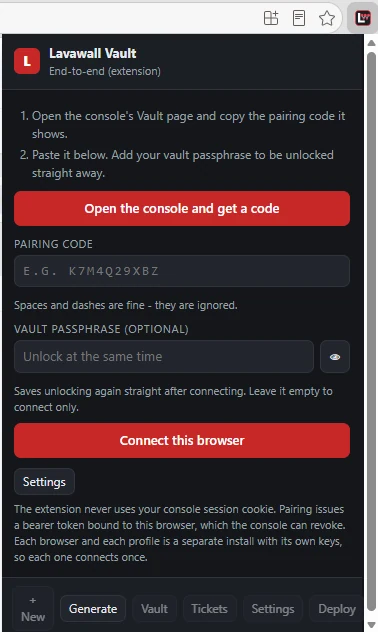
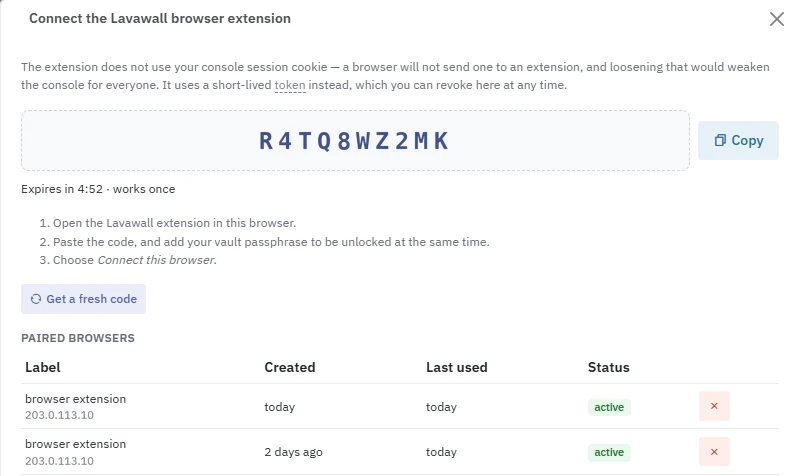
Open the extension, get a pairing code from the console, paste it in, and choose Connect this browser. Add your vault passphrase to unlock at the same time. Each browser and each browser profile connects once, and you can revoke any of them from the console.
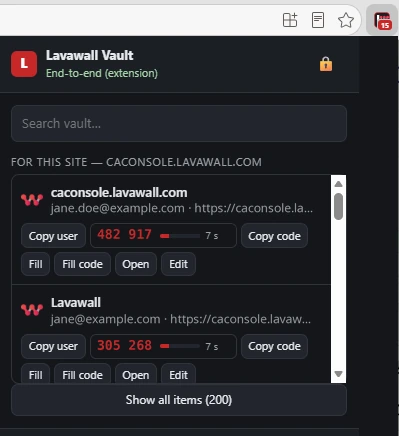
Fill, copy codes, and generate, without leaving the page
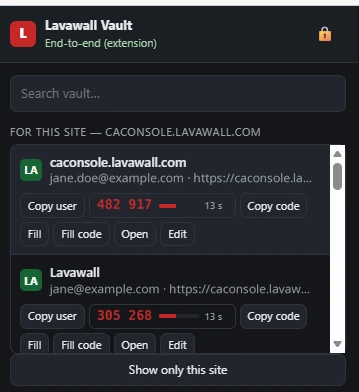
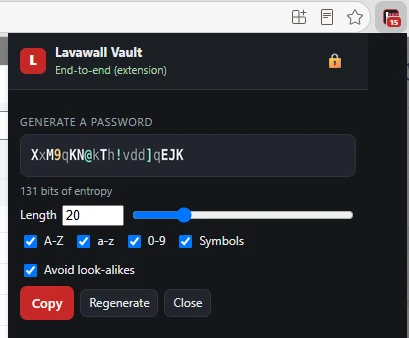
Logins for the site you are on come first, each with its current one-time code counting down. Icons come from your own browser or a colour tile, so your list of sites is never sent to us to look them up.
Share a credential without handing it to us
When you send a single login to someone outside your company, the server is only a courier. The encrypted item arrives opaque, is stored untouched, and is handed back unchanged. The key that opens it travels in a separate channel and never reaches us. Each share has a single-use, ten-minute code, burns on first use, and revokes itself after a few failed attempts.
Recovery keys that you hold
A company’s recovery keys are generated in the browser, downloaded as a passphrase-encrypted file, and printed for the safe. We keep only the public halves. A parent MSP can be a recovery custodian for a tenant it manages, and a tenant can name its own; the private material is always yours, and every use of it is written to the audit trail. There is no vendor escrow of a personal vault, because shared work lives in organization-owned collections from the start.
What we deliberately do not do
Some conveniences other vaults ship are only possible because the server can read something it should not. We left them out, and that is the point.
We do not scan your passwords for reuse or breaches on our servers. Health checks run in your browser, against your own vault.
No administrator has a button to open a user’s item. There is no such button to build, because the server holds no key.
We do not keep a plaintext index of your sites to make autofill matching faster on our side. Matching happens on your device, where the vault is already decrypted.
Pricing
The vault is included in the Complete tier, or added on its own for C$34.90 a year per user. See the pricing page for the full picture, billed in Canadian dollars, month to month.
Frequently asked
- Can Lavawall read the passwords in my vault?
- No. Every item is encrypted in your browser before it reaches us, so the server only ever stores ciphertext. Passwords, usernames, notes, one-time-code seeds, and card numbers are encrypted, and so are the website addresses and the folder names. An administrator looking at the database sees encrypted blobs.
- What cryptography does the vault use?
- The FIPS 140-3 approved set throughout: AES-256-GCM for the items, ECDH P-256 to wrap the keys between people, HKDF-SHA-256, and PBKDF2-HMAC-SHA-256 to turn your passphrase into a key. You can also require a FIPS 140-3 validated security key to unlock, the YubiKey 5 FIPS Series, NIST CMVP certificate #5291.
- How is this different from LastPass, 1Password, Bitwarden, or Keeper?
- It is the vault inside the console that already manages your endpoints and your compliance. When a device is retired or a person is offboarded in Lavawall, their vault access goes with it, with no separate integration project. For how a standalone vault handles offboarding, check that vendor’s documentation.
- Which browsers does the extension support?
- Chrome and Firefox, as a Manifest V3 extension paired to the console with a token that is bound to one user and company, expires, and can be revoked.