A security story
Don't let one click bring your business to a standstill.
It is 4:52 on a Friday. Dana in accounts receivable is staring at an invoice email that feels a little off. She has sat through the ninety-minute training. She has been scolded by a simulation that called her a risk. So she does the thing tired people do at 4:52 on a Friday. She clicks, just to see.
What happens next decides whether Monday is normal or a nightmare. This is the story of that click, told twice: once the way it usually goes, and once with Lavawall® in the picture.
Start free nowWatch the 90-second story
Free plan · no credit card · first module live in minutes · month-to-month, cancel anytime
Watch the 90-second story
Press play, sound on, to see how one click becomes a breach, and how Lavawall® changes the ending.
Start free now → No credit card. Microsoft 365 and phishing reporting are live in under 10 minutes.
Your people stop dreading it
A plain-language verdict in three seconds means users check instead of guess, and get rewarded for catching phishing instead of scolded by a punitive simulation.
Your help desk stops drowning
About 93% fewer phishing tickets, and the few that remain arrive pre-analyzed, even .eml attachments sent by another reporting tool.
You catch the breach first
Real-time Microsoft 365 and Google Workspace breach detection that can reconstruct activity going back years, so the customer never has to call you.
How the story usually goes
Three people, one bad afternoon, and nobody has the information they need in time.
Dana just wanted to get paid on time
The training was long and generic. The last simulation punished her for clicking a link that turned out to be a test, and the email did nothing to help her tell a real invoice from a fake one. So when a real-looking payment notice lands late on a Friday, she has no fast way to check it. She hovers over the link the way she was taught, and sees only a long address pointing at the company's own email-security vendor. It looks safe. She clicks.
Marcus on the help desk is buried
By the time Dana's forwarded email reaches the help desk, it is one of forty reports this week. Most are newsletters and receipts. The forwarding stripped the headers and flattened the attachments, so Marcus cannot even see what the user saw. He does not have the minutes to open each one properly, so the genuinely dangerous message sits in the queue behind a stack of harmless ones.
The breach nobody is watching
While everyone is busy with the ticket flood, the attacker who harvested Dana's session token is quietly setting up an inbox rule in Microsoft 365 and consenting to an OAuth app that keeps their access alive. Nothing pages anyone. The evidence is there, but it is sitting inside a Purview report that nobody has run, and by the time someone thinks to look, the retention window has started to close.
The phone call you never want
Ten days later a customer calls, annoyed, because they have been receiving fake invoices from your domain. That is how you learn there was a breach. Not from a tool. From the one person you least wanted to hear it from. Now it is a standstill: forced password resets, an incident write-up, a nervous conversation about notification, and a customer wondering whether to stay.
Now run the same Friday with Lavawall
Same click. Completely different Monday.
Nothing about Dana changes. She still clicks at 4:52. What changes is how fast the right information reaches the three people who needed it.
The plugin tells Dana what her filter hid from her
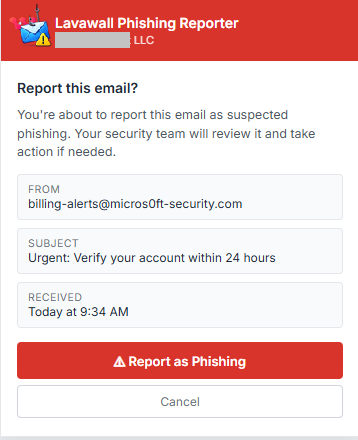
Before she clicks, Dana taps Phish Report in Outlook. In about three seconds the taskpane tells her, in plain language, what the email actually is: a red banner, a clear reason, and a real look at the link. Lavawall® surfaces the warning flags that link wrapping hides from her: her email-security gateway wrapped the link in its own tracking URL, so she can no longer see where it goes. Lavawall® unwraps the link, shows the true destination, its age, and its reputation, and flags the malicious PDF the gateway waved through.
Because the answer arrives right there, most checks never become a report at all. Teams that turn the Reporter on cut phishing-related support tickets by about 93%. Dana deletes the email, feels smart instead of scolded, and goes home.
Your email-security stack rewrites links so users cannot see where they lead. Lavawall® unwraps the links these tools wrap, and works alongside them rather than against them:
- Microsoft 365 Defender (EOP)
- Microsoft Safe Links
- Cisco Secure Email (IronPort)
- Proofpoint
- Proofpoint URL Defense
- Mimecast
- Mimecast URL Protect
- Barracuda
- Barracuda Link Protection
- Egress Defend
- Vade Secure
- Sophos Email
- Forcepoint
- Symantec Email Security.cloud
- Trend Micro Email Security
- Storagepipe / Thrive
- FireEye / Trellix
Marcus gets real tools instead of a forwarding mess
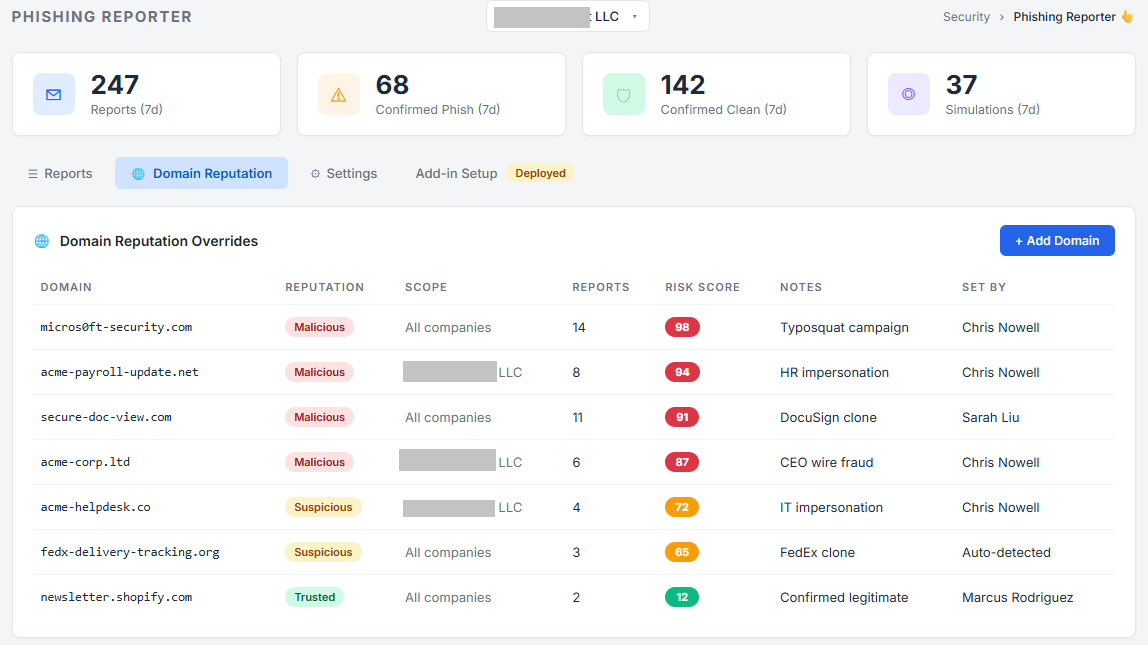
For the small share of emails a user still wants a human to confirm, Marcus is not stuck squinting at a forwarded copy with the evidence stripped out. Lavawall® captures the full original message (every header, link, and attachment exactly as the user received it) and gives techs fast tools to evaluate it. He can even open a .eml file that another reporter, such as KnowBe4 PhishAlert, delivered as an attachment: the format that usually turns a two-minute check into a twenty-minute one. The analysis is already done, the reasons are spelled out, and every reported domain is scored over time so repeat offenders rise to the top.
That is the quiet win: the 6% of reports that still need a person arrive pre-analyzed, so Marcus spends his afternoon on the things that actually matter, instead of drowning in newsletters. That frees the whole team to do what nobody had time for before: watch for real breaches.
The breach surfaces in real time, not in a phone call
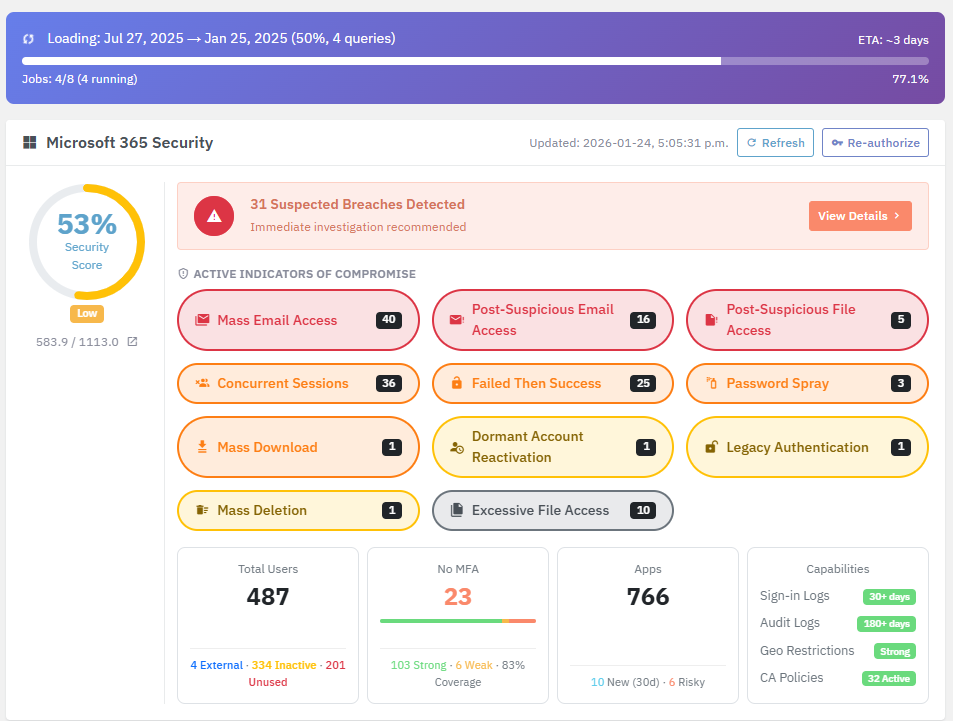
In the second version of the story, the attacker never gets a quiet ten days. The moment that inbox rule is created and that OAuth app is consented to, Lavawall®'s Microsoft 365 and Google Workspace breach-detection engine correlates the signals and raises a real-time alert. No waiting hours for a Purview report to generate, and no gap where the evidence has already aged out. Lavawall® can reconstruct suspicious activity going back years, so a compromise that started long before today does not stay hidden.
Alerts come enriched, with automatic research and tech-guided next steps, and land as clear, actionable reports rather than raw log dumps. You find the breach, understand it, and shut it down before a customer ever picks up the phone.
In the second version of this story, nobody makes the embarrassing phone call. That version starts with one free signup.
Start free now →Wind the clock back further, and the click never lands at all
The best version of the story is the one where Dana's email never reaches her, because the gaps that let it through were closed first. Once you are on Lavawall®, you find and fix the weaknesses across your whole surface faster, so the breach never happens in the first place.
SPF, DKIM, and DMARC gaps found and fixed, with the exact DNS records, so spoofed mail cannot pass as you and your own mail lands in the inbox.
Internet and web
External attack-surface and domain scanning surfaces the exposed service, the expired certificate, and the risky web app before an attacker does.
Endpoints
Missing patches, weak configurations, and risky admin rights across Windows, Mac, and Linux, ranked so you close the ones that matter first.
Network
LAN and WAN discovery finds the unmanaged device, the shadow appliance, and the gap in coverage that a quiet intruder would use.
And Dana never dreads a simulation again
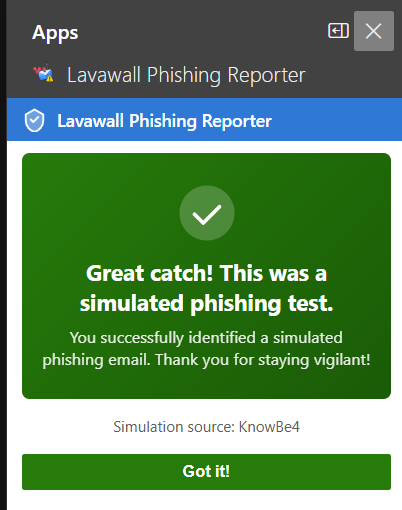
When a user reports a training simulation, Lavawall® recognizes it automatically and shows a positive screen instead of a scare: well spotted, this was a test, you did the right thing. Nobody files a ticket or gets scolded, and that reward is what makes good habits stick. It works with the simulations you already run, so you keep your program and simply make catching a phish feel good.
The result is the ending every business wants: employees who check instead of dread, a help desk that is no longer drowning, and breaches caught early instead of announced by a customer.
Lavawall® gives positive reinforcement to users who catch a simulation from Lavawall® or any of these platforms:
- KnowBe4
- Microsoft Defender Attack Simulator
- Proofpoint Security Awareness
- Cofense PhishMe
- IRONSCALES
- Hoxhunt
- Barracuda PhishLine
- Mimecast Awareness Training
- Infosec IQ
- Sophos Phish Threat
- Huntress Security Awareness
- Abnormal Security
- GoPhish
- Lucy Security
- Wombat / Proofpoint
- Terranova Security
- Ninjio
- Curricula
- Phished.io
- LMS365 Awareness
Change how your story ends.
Give users a fast answer, give your techs real tools, and see the breach before your customer does. Start free in minutes.
Start free now See the Phishing ReporterFree plan, no credit card, month-to-month. Built and run by ThreeShield, a Calgary audit firm with CISSP and CISA staff.
Common questions
- How much does the Phishing Reporter actually cut ticket volume?
- By about 93%. Teams that switch it on see phishing-related tickets fall that far because the user gets a plain-language verdict the moment they check a message. The reports that remain arrive pre-analyzed, and techs can open even a .eml file another tool sent as an attachment.
- Why would a breach go unnoticed if we already have Microsoft 365?
- Because the evidence is slow to reach you. Purview can surface it, but someone has to run the search, and how far back it goes depends on your licence (check Microsoft’s documentation). Lavawall® correlates Microsoft 365 and Google Workspace activity continuously, alerts in real time, and can reconstruct suspicious activity going back years, so you find the breach before a customer does.
- Does Lavawall replace our simulations and training?
- Only if you want it to. Lavawall includes concise, to-the-point training that users prefer over long cinematic or animated courses that chew up productivity, and it runs phishing simulations natively. But if you have already invested in another platform, Lavawall works alongside it and makes it better, so your IT manager is not paying twice, and you can cut over smoothly whenever it suits you.
- Does it track and reward users who catch our simulations?
- Yes. It recognizes a reported simulation automatically, shows a positive well-spotted screen, and records the catch, so you can give positive reinforcement and report on who is engaged. It knows simulations from KnowBe4, Microsoft, Proofpoint, and roughly twenty other platforms.
- Which email filters and link-protection tools is it compatible with?
- The major gateways, and it unwraps the links they hide, including Microsoft 365 Defender, Safe Links, Cisco Secure Email, Proofpoint and URL Defense, Mimecast and URL Protect, Barracuda and Barracuda Link Protection, Egress Defend, Vade Secure, Sophos Email, Forcepoint, Symantec, Trend Micro, Storagepipe / Thrive, and FireEye / Trellix.