Company Summary
Compare the health of every company you manage in one table, so you know which client needs attention first.
What the page is for
Company Summary is a page in the Lavawall® console, in the Reports area. Lavawall is the RMM, security, and compliance platform from ThreeShield, built and hosted in Canada. About this feature.
The Company Summary gives one row per company. Each row counts that company's devices and their problems: computers waiting for a restart, antivirus issues, computers needing an update, missing updates, configuration problems, and issues by severity.
It is built for MSPs and IT teams who look after several organizations, but it works for a single organization too. The figures come from the Lavawall agent on each computer. The report always covers all of your companies.
What you see
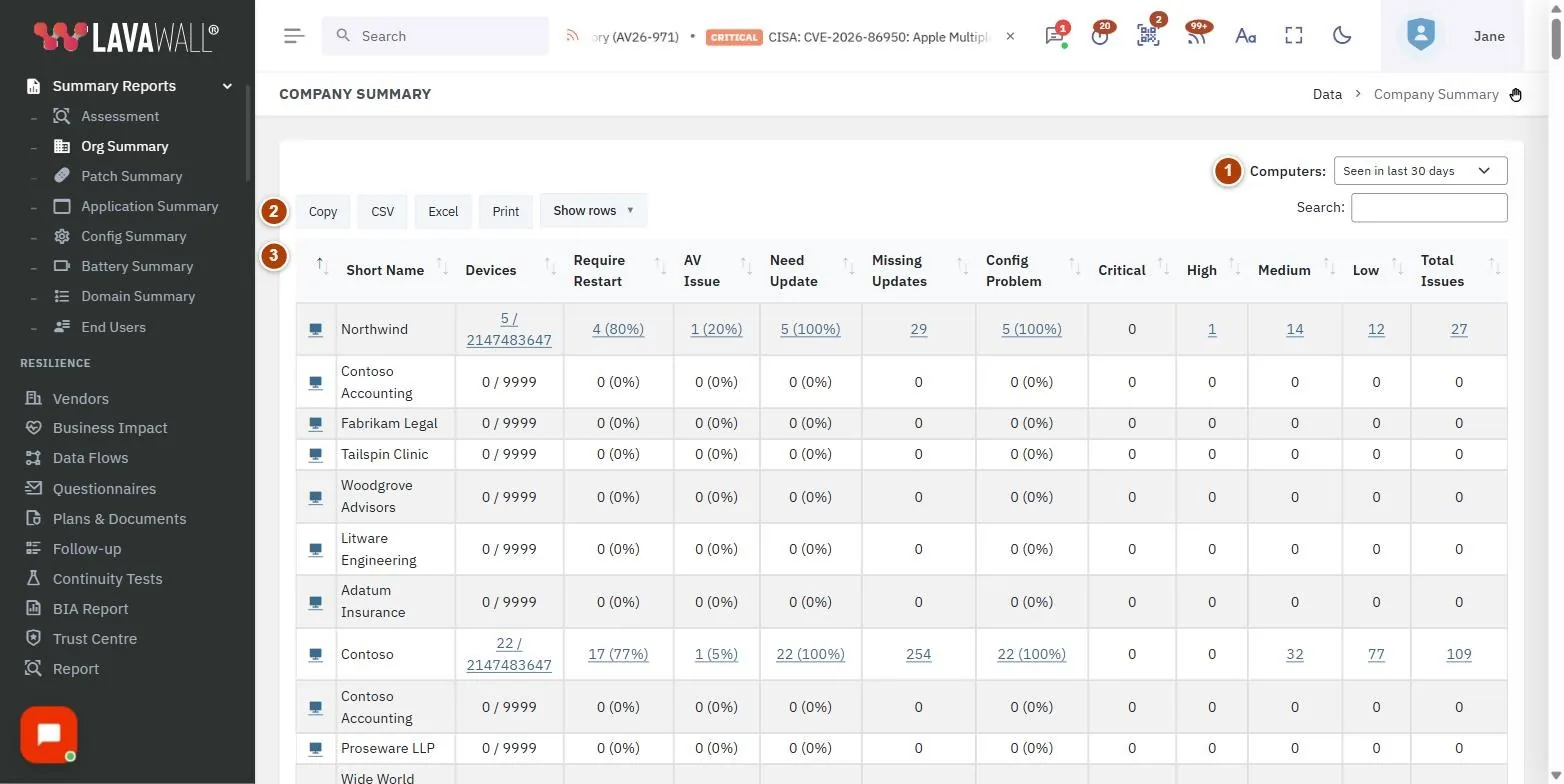
- Computers filter: include computers Seen in last 30 days (the default), Seen in last 90 days, Seen in last 365 days, or Show all.
- Table buttons and search: Copy, CSV, Excel, Print and Show rows, plus a search box.
- Company table: the company, Short Name, Devices, Require Restart, AV Issue, Need Update, Missing Updates, Config Problem, Critical, High, Medium, Low and Total Issues.
How to use the report
How to find the company that needs the most help
- Click the Total Issues heading to sort by it.
- Or sort by Critical or AV Issue to put the most urgent problems first.
- Switch to that company in the company selector and open its dashboards or the Computers list to fix the problems.
How to prepare a client report
- Set the Computers filter to match the reporting period.
- Click Excel or CSV to download the table, or Print.
Tips
- Keep the default Seen in last 30 days so retired computers do not inflate the counts.
- Critical, High, Medium and Low are counts of configuration issues by risk level. The Configuration Summary shows which checks failed.
- Search by short name to jump to one client.
Troubleshooting
- "You have not added any companies yet."
- Click Add clients to add your first client company.
- "Could not load data".
- Click Retry in the message, or reload the page.
- A company shows no devices.
- No computers for that company have been seen in the chosen period. Widen the Computers filter, or install the agent for that company.
Related articles
Still need help?
Search the support centre, or contact our support team and tell us which page you were on:
- Chat now: use the chat button in the bottom-right corner of this page to reach our team right away. Where cookie consent is needed, the chat starts after you accept (cookie settings).
- Email: send our support team a message through the contact page. It goes straight to a person.
- Phone:
 AB: 1-403-538-5053
 US: 1-406-988-7333
 UK: +44 20 3695 9786
Names, companies, devices and figures in the pictures are examples. Other product and company names are trademarks of their respective owners.