Zendesk integration
Unify Zendesk with your MSP console
Lavawall® syncs your Zendesk tickets, organizations, users, knowledge base, and macros into one console, so you can see support tickets beside device health and run remote-support sessions that file straight to the right ticket. Keep Zendesk as your customer-facing helpdesk while your team works from a single pane.
Start free, no credit card See what syncs
Tickets · organizations · users · KB articles · macros · dynamic content
See it in the Lavawall® console
Real screens, shown with example data.
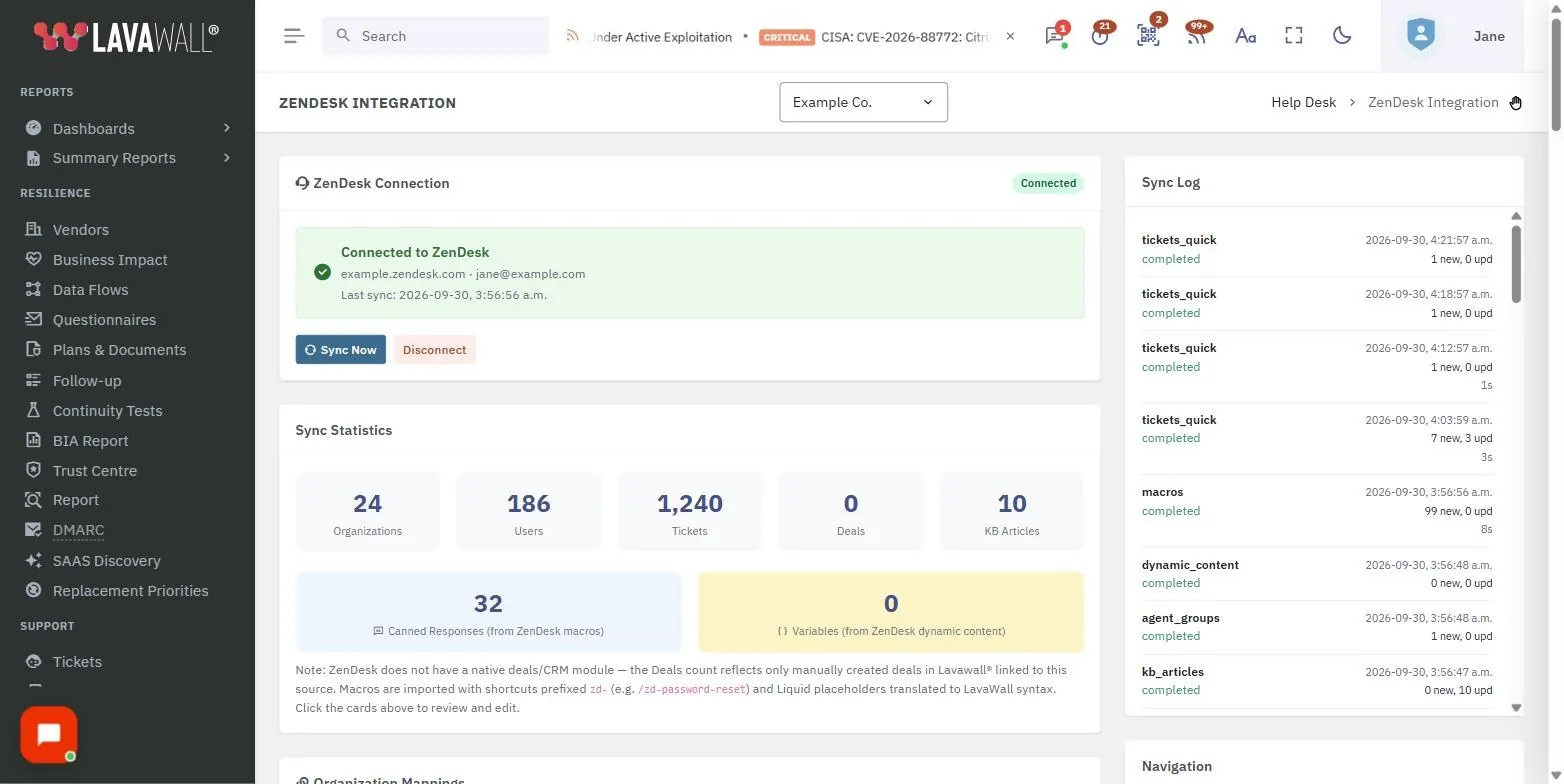
This page is about the integration, not the switch
There are two different questions an MSP can ask about Zendesk and Lavawall®. The first is "how do I make Zendesk and Lavawall® work together?", and that is what this page answers. The second is "should I move off Zendesk entirely?", which is a comparison question. If a full switch is what you are weighing, read our side-by-side at alternative to Zendesk. Everything below assumes you are keeping Zendesk in place and connecting it to Lavawall®.
Why connect Zendesk to Lavawall®?
Plenty of MSPs run Zendesk for customer-facing support and a separate RMM for devices. That split means a technician answering a Zendesk ticket cannot see the endpoint's patch state, security posture, or recent alerts without switching tools. Connecting the two lets you see tickets alongside device health in one console, import your Zendesk macros as canned responses, and run remote-support sessions that automatically file to the relevant ticket, all while Zendesk stays the front door your customers already know.
What gets synced
The connector runs incrementally every few minutes and keeps the following in step:
- Organizations mapped by name, with domains, notes, and tags.
- Users and contacts with email, phone, role, organization, and agent flags.
- Tickets including subject, description, status, priority, requester, assignee, timestamps, comments, and CC'd users.
- Knowledge base articles with titles, bodies (including images), categories, and sections.
- Agent groups and their memberships, so canned-response visibility matches Zendesk.
- Dynamic content imported so Zendesk placeholders become Lavawall® variables.
- Macros (shared, group-restricted, and personal), with images preserved and Liquid translated.
Macros and canned responses
Your Zendesk macros carry across as canned responses with their detail intact. Embedded images stay in place, shortcuts (slash commands) are preserved, owner attribution is kept, group restrictions are honoured, and categories carry over. Zendesk's Liquid markup is translated into Lavawall® placeholders, and inactive macros are handled cleanly so your response library stays tidy.
Setup
You need a Zendesk admin user, an API token generated in the Zendesk Admin Center, and your Zendesk subdomain. In Lavawall®, go to Helpdesk, then Sources and Setup, enter the credentials, test the connection, and save. Then switch on automatic syncing so recurring syncs run on their own. The same setting also covers Microsoft Bookings, HubSpot, training, and custom lead magnets.
Data and privacy
Synced data lands in your Lavawall® tenant database, and credentials are encrypted at rest. The connector is read-only, so it does not write back to Zendesk. Sync activity is logged for audit, and deleting the source removes the credentials and stops syncs. Imported records remain for historical context and can be removed when you choose.
Pricing
The Zendesk connector is included with all Lavawall® MSP plans at no extra cost.
Frequently asked
- Is this the same as switching from Zendesk to Lavawall®?
- No. This page is about the integration, which lets you keep Zendesk as your customer-facing helpdesk while unifying tickets, macros, and knowledge base with Lavawall®. If you are weighing a full switch instead, see our comparison at alternative to Zendesk.
- Does the connector import my Zendesk macros?
- Yes. Shared, group-restricted, and personal macros are imported as canned responses, with embedded images preserved, shortcuts kept, owner attribution retained, group restrictions honoured, and Liquid markup translated into Lavawall® placeholders.
- What does the Zendesk connector cost?
- Nothing extra. The Zendesk connector is included with all Lavawall® MSP plans at no extra cost.
- Does the connector write back to Zendesk?
- No. The connector is read-only. Credentials are encrypted at rest, sync activity is logged for audit, and deleting the source removes the credentials and stops syncs. Imported records remain for historical context.