HubSpot integration
Bring HubSpot into your MSP helpdesk
Lavawall® syncs your HubSpot companies, contacts, deals, tickets, and activity into one console, so a technician opening a ticket sees the customer's open deals, recent meetings, and sales-call notes right beside device health and security alerts.
Start free, no credit card See what syncs
Companies · contacts · deals · tickets · notes · calls · meetings
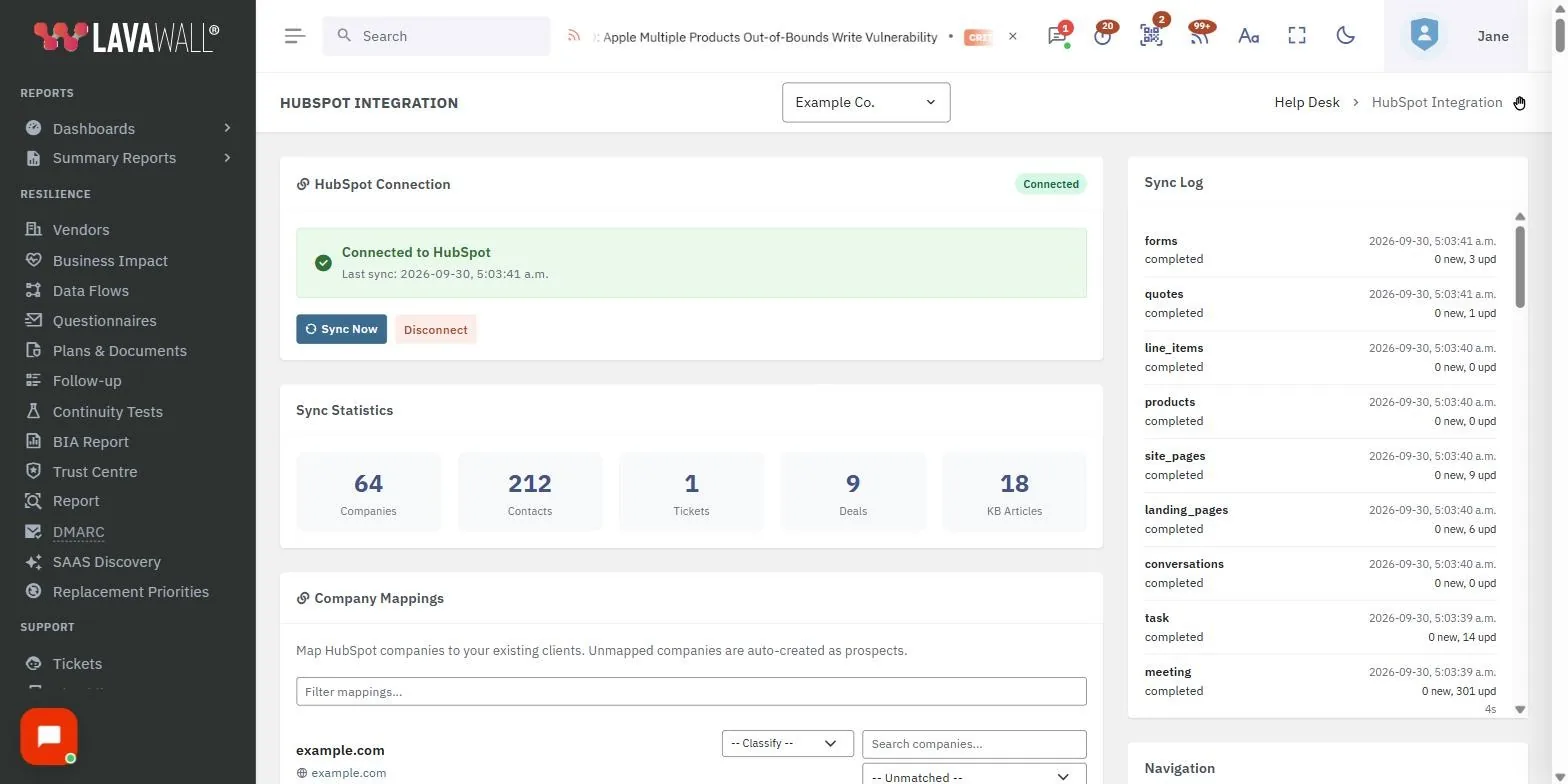
See it in the Lavawall® console
Real screens, shown with example data.
Why connect HubSpot to Lavawall®?
Most MSPs have customer data fragmented across at least three systems. The RMM knows the devices, the PSA knows the tickets, and HubSpot knows the deals, the marketing emails, and the renewal conversations. When those live apart, a technician answering a ticket has no idea whether the account is a strategic client mid-renewal or a low-margin engagement running over budget.
Connecting HubSpot to Lavawall® closes that gap. You can view a customer's open deals, recent meetings, and sales-call notes alongside device health when you open a ticket, pull billable hours by client without leaving the helpdesk, and flag accounts where ticket volume or escalation rate does not match their CRM signal. Deal records link back to companies, so the full picture stays in one place.
What gets synced
The connector runs every few minutes and is fully incremental, so only changed records cross the wire after the initial backfill.
| Category | Objects |
|---|---|
| Core CRM | Companies, Contacts, Deals, Pipelines, Tickets |
| Activity and communication | Notes, Emails, Calls, Meetings, Tasks, Conversations |
| Sales tools | Quotes, Products, Line items |
| Marketing assets | Forms, Landing pages, Site pages, Blog posts |
Companies map to your client organizations by name and domain, and carry industry, size, owner, lifecycle stage, custom properties, and the full activity timeline. Contacts arrive as end-users and decision makers with email, phone, job title, lifecycle stage, lead status, and last-touch dates. Deals show pipeline, stage, amount, close date, owner, and associated companies and contacts, with your pipeline structure imported to match your HubSpot setup exactly. Tickets from HubSpot Service Hub bring their pipeline, stage, priority, and associations across too.
Beyond the core records, the connector also pulls notes, logged sales emails, call records with durations and dispositions, meetings, outstanding tasks, and HubSpot inbox conversations, plus quotes, products, per-deal line items, and marketing assets such as forms, landing pages, site pages, and blog posts for campaign and knowledge-base context. At present the connector is read-only from HubSpot into Lavawall®, and two-way sync is on the roadmap.
What you can do once it is connected
CRM context on every ticket
The ticket view shows the company's open deals, lifecycle stage, deal owner, recent notes, and last sales touch, so technicians answer with full context.
Revenue-aware prioritization
Sort tickets by deal value or lifecycle stage, and override SLA defaults by deal stage so your best accounts get the response they expect.
Churn-risk surfacing
Lavawall® flags accounts where ticket volume or escalation rate does not match their CRM signal, so at-risk relationships stand out early.
Time tracking by deal
Billable hours from remote support and ticket work roll up to the deal, so you can see which customer engagements are eating into margin.
Single-pane customer search
Search by company or email and get every artifact in one place: tickets, deals, notes, meetings, calls, devices, and security alerts.
Deal-aware variables
Canned responses can reference deal-level custom variables (for example, deal owner name and close date) so replies stay accurate and personal.
Setup in a few clicks
HubSpot uses OAuth, so there are no API tokens to manage by hand and authorization stays live after the initial connection.
- In Lavawall®, go to Tickets, then Setup, then Imports.
- Click HubSpot Integration, then Connect HubSpot to be redirected to HubSpot.
- Sign in with a user that has access to the data you want (an admin works for everything, or a read-only portal user with Marketing, Sales, and Service permissions is enough).
- Review the requested scopes, click Connect app, and return to Lavawall®.
- The first sync begins immediately. Expect a few minutes for a small portal, longer for portals with hundreds of thousands of activities.
- Turn on automatic syncing under account settings so recurring syncs run on their own. The same setting keeps Microsoft Bookings, Zendesk, training, and custom lead magnets in sync too.
The setup page shows live object counts and per-step success or failure indicators, and any permission error names the exact missing OAuth scope so you know precisely what to grant.
Data and privacy
All data syncs into your Lavawall® tenant and is stored in the same region as your console data. OAuth access and refresh tokens are encrypted at rest and never displayed back in the UI, and only Super Admins on your account can edit the source configuration. The connector requests read-only access, so it does not write to HubSpot, does not create or modify HubSpot records, and does not send marketing emails.
Every sync is logged with its start time, duration, per-object counts, and any error messages under Tickets, Setup, Imports, HubSpot Integration, Sync history. Deleting the HubSpot source revokes the OAuth tokens and stops syncs. Imported records stay for historical context but can be bulk-deleted whenever you choose.
Frequently asked
- Is the HubSpot sync two-way?
- Not yet. At present the connector is read-only from HubSpot into Lavawall®. It does not create or modify HubSpot records and it does not send marketing emails. Two-way sync (creating HubSpot deals or updating contact properties from Lavawall®) is on the roadmap.
- How much does the HubSpot connector cost?
- The HubSpot connector is included with all Lavawall® MSP plans at no extra cost. The only thing that affects throughput is your HubSpot portal's API rate limit, which the connector respects automatically and backs off from when needed.
- How often does data sync?
- The connector runs every few minutes and is fully incremental, so after the initial backfill only changed records cross the wire. You can also trigger an immediate re-sync from the setup page without waiting for the next scheduled run.
- How is the connection secured?
- The connector uses HubSpot OAuth, so there are no API tokens to manage manually. Access and refresh tokens are encrypted at rest and never displayed back in the UI, and only Super Admins on your account can edit the source configuration.