Breach detection
Judge every user against their own normal.
Lavawall® keeps a baseline of each user's usual sign-in locations and daily activity, flags unusual sign-ins and unusual file and email access, and charts any user's last 7, 30 or 90 days. A stolen session or a quiet data grab stands out against that person's own pattern.
Last updated
Start my free trial, no credit cardMicrosoft 365 breach detection
Per-user baseline · 7, 30 and 90 day trends · unusual file and email access
See it in the Lavawall® console
Real screens, shown with example data.
Why a generic threshold is not enough
A busy finance lead and a part-time receptionist have very different normal days. A single limit for everyone either floods you with alerts or misses the account that quietly pulls data. Comparing a person with their own history is how a stolen session or a departing employee shows up, and it matters more as attackers automate the early steps of a break-in.
What Lavawall does
Builds a baseline per user
One of the breach indicators Lavawall looks at is each user's baseline: the IP addresses they usually sign in from and how much they usually sign in and work with files each day. Activity outside it adds evidence to an incident.
Charts any user over time
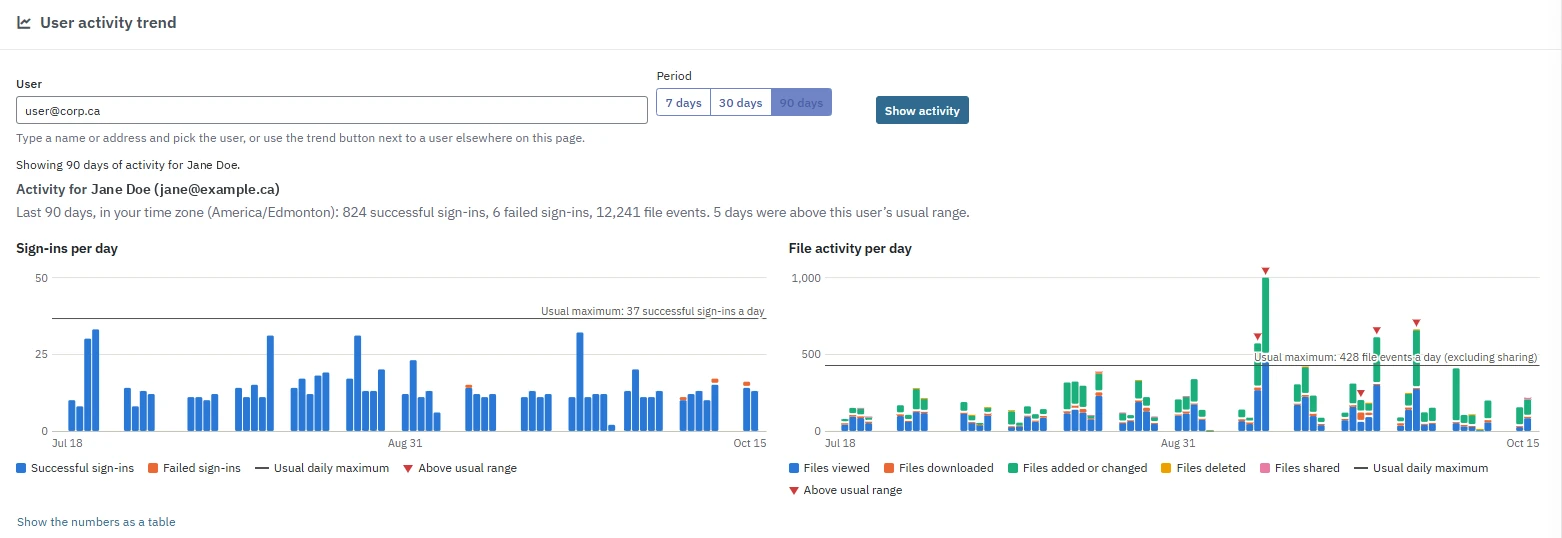
In the Microsoft 365 Breach Console, open the User activity trend to see successful and failed sign-ins and file activity (viewed, downloaded, added or changed, deleted and shared), with the usual daily maximum and the days above it marked.
Flags unusual access
Lavawall flags malicious user behaviour patterns and unusual file and email access volumes and patterns in Microsoft 365 and Google Workspace, including unusual downloads, deletions, sharing and after-hours activity.
Shows who touched which file
Pair it with file monitoring: SharePoint and OneDrive, Google Drive and on-premises file servers record who opened, changed, shared or deleted what.
- Baseline for each user
- Usual sign-in locations
- 7, 30 and 90 day trends
- Days above usual range marked
- Unusual file and email access
- Numbers available as a table
Plans
Breach detection and the User activity trend are part of M365 / Google Workspace Monitoring, included in Grow, Professional and Complete. See pricing.
Frequently asked questions
What is user activity benchmarking?
User activity benchmarking compares what a person does today with what they normally do. Lavawall keeps a baseline for each user, including the IP addresses they usually sign in from and how much they usually sign in and work with files each day.
How does Lavawall show whether a day was unusual for a user?
In the Microsoft 365 Breach Console, the User activity trend card shows 7, 30 or 90 days of sign-ins and file activity for any user. It draws the user's usual daily maximum and marks the days above it, and the numbers are also available as a table.
What counts as an anomaly in Lavawall?
Lavawall flags malicious user behaviour patterns and unusual file and email access volumes and patterns. A sign-in from an address outside the user's baseline, or a day well above their usual activity, adds evidence to an incident.
Does the baseline work for Google Workspace?
Lavawall flags unusual file and email access volumes and patterns in Google Workspace, and its Google Drive monitoring flags mass downloads. The per-user activity trend card is part of the Microsoft 365 Breach Console.
Can Lavawall catch an employee taking files before they leave?
Lavawall's SharePoint, OneDrive and Google Drive monitoring flags mass downloads and external shares, so you can preserve evidence before disabling an account.
Which Lavawall plans include user activity anomaly detection?
Breach detection and the User activity trend are part of M365 / Google Workspace Monitoring, included in Grow, Professional and Complete. See the pricing page for current plans.