Battery Summary
Find laptops whose batteries are wearing out before they let their users down.
What the page is for
Battery Summary is a page in the Lavawall® console, in the Reports area. Lavawall is the RMM, security, and compliance platform from ThreeShield, built and hosted in Canada. About this feature.
The Battery Summary lists every computer with a battery and shows how healthy each battery is. It compares the battery's full charge capacity today with the capacity it was designed for, and shows how many charge cycles it has been through.
Laptops typically hold about 80% of their battery capacity until around 500 charge cycles, which is about three years of service. Batteries well below that are candidates for replacement.
The data comes from the Lavawall agent on each computer. Use the company selector at the top of the console to see one company or all of them.
What you see
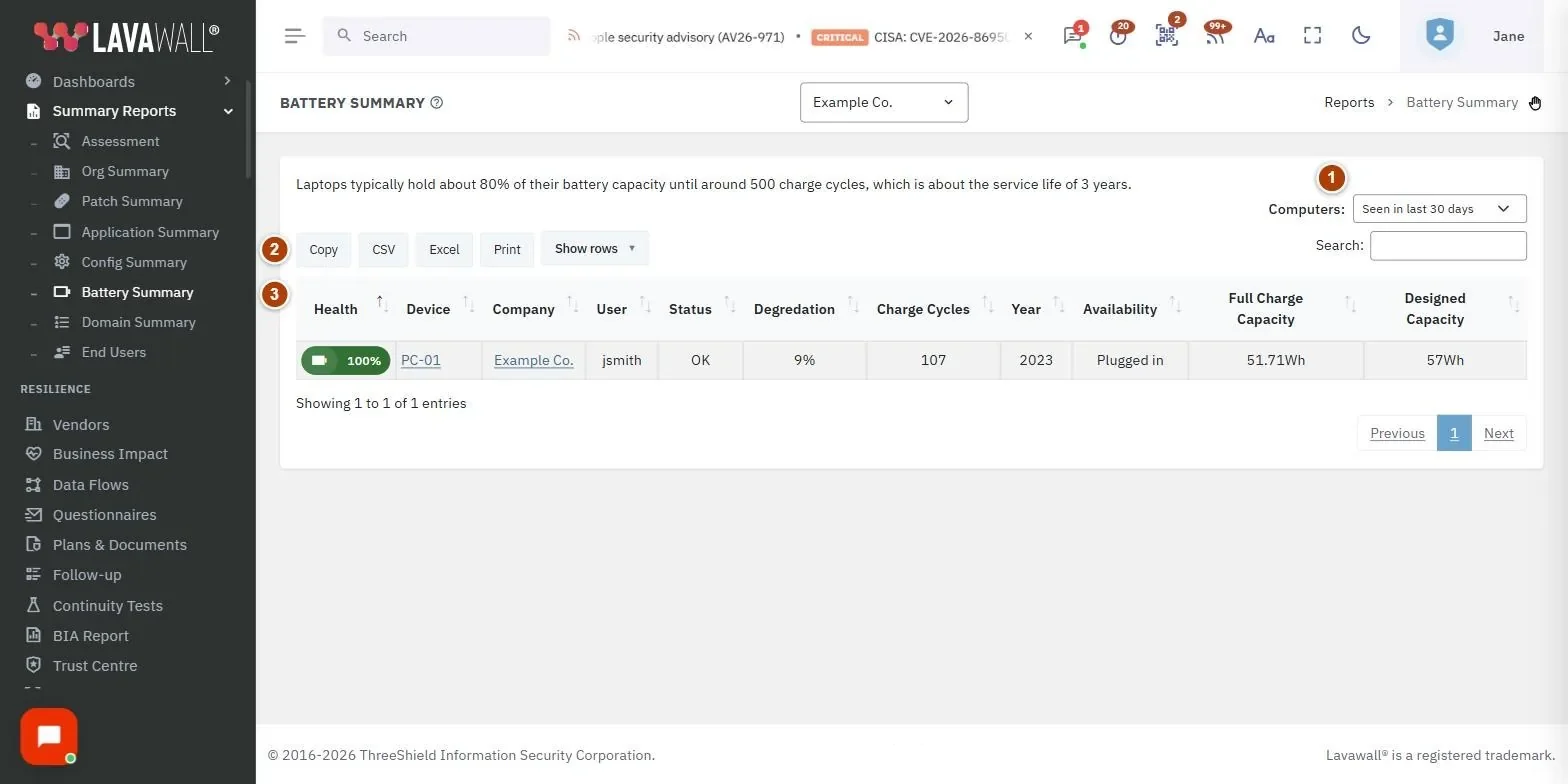
- Computers filter: include computers Seen in last 30 days (the default), Seen in last 90 days, Seen in last 365 days, or Show all.
- Table buttons and search: Copy, CSV, Excel, Print and Show rows, plus a search box.
- Battery table: Health, Device, Company, User, Status, Degradation, Charge Cycles, Year, Availability, Full Charge Capacity and Designed Capacity.
How to use the report
How to find batteries to replace
- Sort by Health or Degradation by clicking the column heading.
- Look for batteries well under 80% health, or with high Charge Cycles.
- Look the device up in Devices › Computers to check its details, then plan a replacement.
How to export the list
- Click Excel or CSV to download, Copy to copy, or Print.
- Use Show rows to change how many rows appear on screen.
Tips
- Compare Full Charge Capacity with Designed Capacity to see how much capacity has been lost.
- Use the Year column to decide between replacing a battery and replacing the whole laptop.
- The Overview's Battery Health card counts batteries with more than 500 charges and batteries with more than 20% wear.
Troubleshooting
- "You have not added any Devices with batteries yet."
- No laptops with the agent were found for this company and time range. Click Add computers to install the agent, or widen the Computers filter.
- "Could not load data".
- Click Retry in the message, or reload the page.
- A desktop computer is missing.
- Desktops have no battery, so they are not listed.
Related articles
Still need help?
Search the support centre, or contact our support team and tell us which page you were on:
- Chat now: use the chat button in the bottom-right corner of this page to reach our team right away. Where cookie consent is needed, the chat starts after you accept (cookie settings).
- Email: send our support team a message through the contact page. It goes straight to a person.
- Phone: AB: 1-403-538-5053, BC: 1-778-731-1339, ON: 1-289-724-8829, US: 1-406-988-7333, UK: +44 20 3695 9786.
Names, companies, devices and figures in the pictures are examples. Other product and company names are trademarks of their respective owners.