Network drive management
The mapped drive that's "just not there today" fixes itself.
Lavawall® sees every drive on a Windows computer, fixed, removable or mapped, and can automatically reconnect a saved network drive the moment it drops, so people stop losing the first ten minutes of their day to a missing share.
Start free, no credit card See how it works
Automatic reconnection · per-organization default · per-computer override · full drive inventory
See it in the Lavawall® console
Real screens, shown with example data.
A small annoyance that eats a lot of tickets
A mapped network drive drops for all kinds of ordinary reasons: a VPN that connects a few seconds after login, a brief network blip, a server that was rebooting when the computer signed in. Windows doesn't reconnect it on its own, so the person either notices a missing drive letter and works around it, or opens a ticket and waits.
Lavawall®'s helper watches for exactly this and reconnects a saved network drive automatically, using the credentials already saved for it, without a tech ever being paged.
Set it once, override where you need to
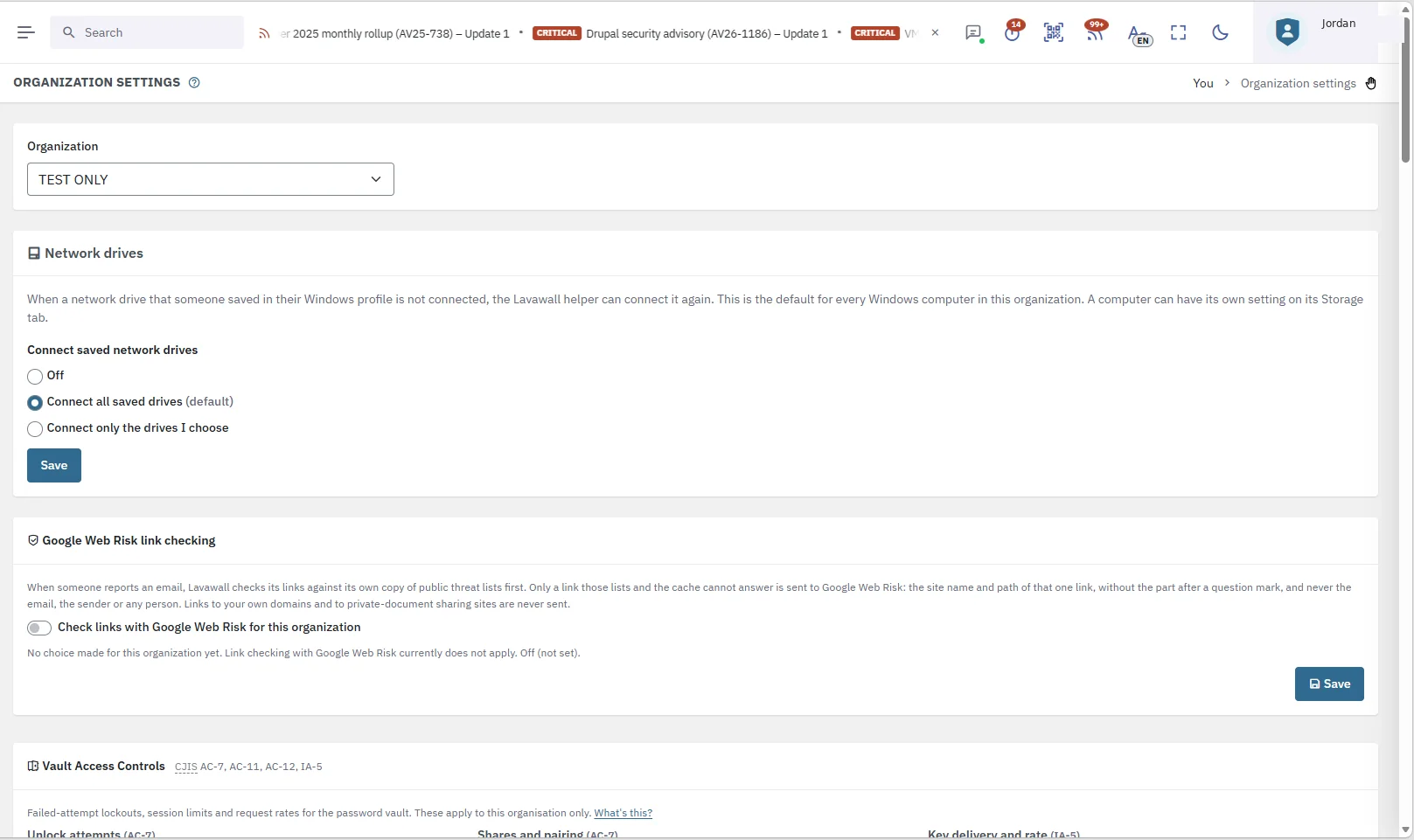
One default for the organization
Choose off, connect all saved drives, or connect only the drives you choose, and every Windows computer in the organization follows it unless you say otherwise.
A different setting per computer
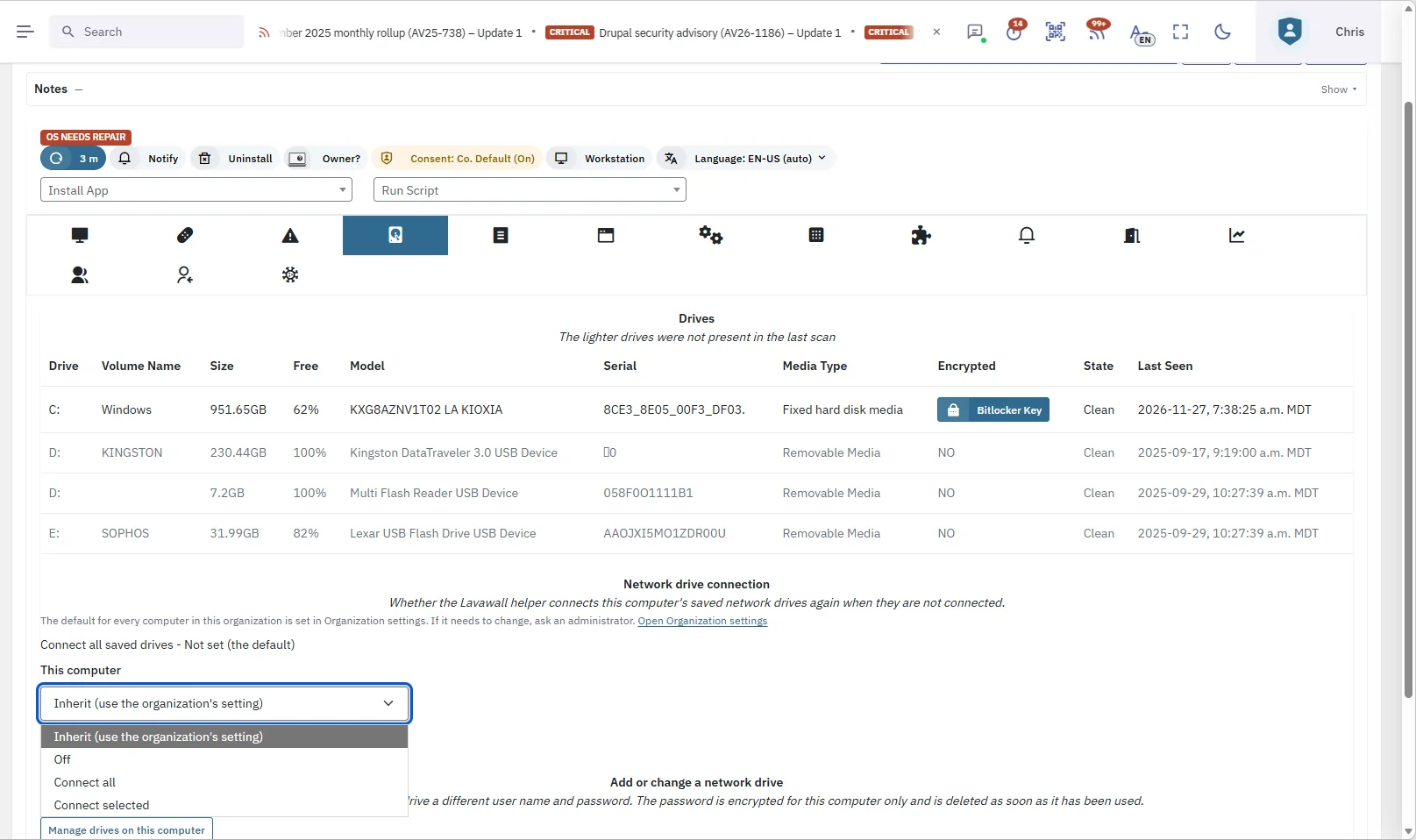
A computer can inherit the organization default or get its own setting right on its Storage tab, for the one machine that needs different handling.
Add or change a saved drive
Add a network drive with its own user name and password from the same screen. The password is encrypted for that computer only and deleted again once it has been used.
Every drive, in one list
Fixed, removable and network drives all appear together, with size, free space, media type, encryption status, state, and when each was last seen.
BitLocker recovery, right there
A Bitlocker Key button sits next to an encrypted drive, so recovering a locked-out drive doesn't mean digging through a separate key vault.
No background cron jobs on the endpoint
Reconnection runs as part of the Lavawall agent's normal activity on the computer, not as a separate scheduled task someone has to remember exists.
Tired of "my drive isn't showing up" tickets?
ThreeShield, the CISSP/CISA team that builds Lavawall®, will help you roll out automatic reconnection across your fleet without surprising anyone.
Common questions
- What does automatic network drive reconnection do?
- When someone's mapped network drive isn't connected, usually because of a slow login, a VPN that connected late, or a brief network hiccup, the Lavawall helper reconnects it for them, so they don't have to notice it's missing or ask IT to fix it.
- Can I turn this off for some computers?
- Yes. Set a default for the whole organization in Organization settings, then give any single computer its own setting (off, connect all saved drives, or connect only the ones you choose) on that computer's Storage tab.
- Does Lavawall see USB and external drives too?
- Yes. The same Storage view lists every drive on the computer, including fixed, removable and BitLocker-encrypted drives, with size, free space, encryption status and when each was last seen.
- Do I need to reconnect drives myself during a support session?
- Not usually. Since the setting runs continuously in the background, most reconnection issues are already resolved before a ticket is raised. When one does need attention, the setting and the drive list are both on the same Storage tab.