Script Variables
Store the values your scripts need for each company, such as a server path or licence key, so one script works everywhere.
What the page is for
Script Variables is a page in the Lavawall® console, in the Scripting & automation area. Lavawall is the RMM, security, and compliance platform from ThreeShield, built and hosted in Canada. About this feature.
Script variables let you write a script once and give it different values for each company. In a script, a variable is written as {{variable_name}}. When the script runs on a device, Lavawall replaces the placeholder with the value for that device's company.
This page shows and edits the variables for the company chosen in the company selector at the top of the console. The page tells you which company you are editing.
Values can come from three places. Lavawall uses the first one it finds:
- A value set for this company.
- The parent company's value, if the variable is set to inherit.
- A global value that applies to everyone.
There are two kinds of variable for values you want to keep private:
- Variables marked Secret on this page are write-only on screen: they are never shown in the browser, in a script's parameters, results or the activity log, and are only filled in on the device when the script runs. Lavawall still stores them in readable form, so they are not end-to-end encrypted.
- Secret variables in the vault are encrypted in your browser, and Lavawall stores only the encrypted copy. Only the computers you allow can open them, just before the script runs. In a script you write them as
{{secret:NAME}}. They are managed on the vault's Script secrets tab; see Script secrets in the Vault.
For passwords, tokens and keys, use secret variables in the vault.
What you see
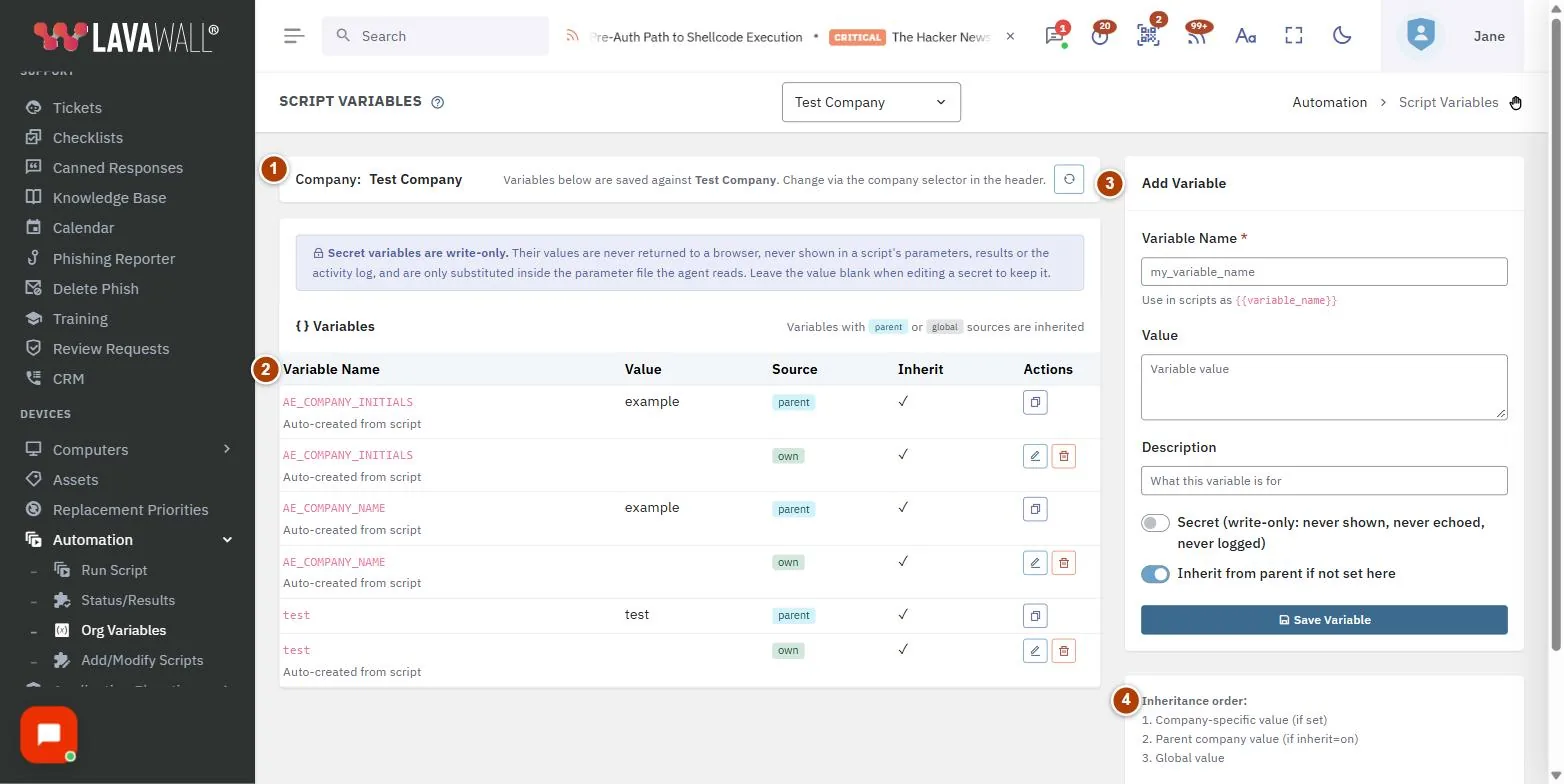
- Company: the company whose variables you are editing. Change it with the company selector at the top of the console.
- Variables: a table with Variable Name, Value, Source, Inherit and Actions. Inherited values show where they came from.
- Add Variable: Variable Name, Value, Description, Secret and Inherit from parent if not set here, with Save Variable and Cancel Edit.
- Inheritance order: a reminder of the order Lavawall uses to find a value.
Below the variables, Secret variables in the vault lists the vault secrets this company's scripts can use, with Name, Who can read it (Company-wide or one computer), Child organizations (Shared or Not shared), Owner (This organization or Parent organization) and Last changed. Values are never shown here. Click Manage in the vault to add or change them. Both tables can be sorted by any column and filtered.
How to manage variables
How to add a variable
- Choose the company in the company selector at the top of the console.
- Under Add Variable, enter a Variable Name using letters, numbers and underscores only.
- Enter the Value and an optional Description.
- Tick Secret if the value is a password or key.
- Leave Inherit from parent if not set here ticked if client companies should use this value when they have none of their own.
- Click Save Variable.
How to use a variable in a script
- In Add/Modify Scripts, type
{{variable_name}}in the script, or use Insert Variable. - Make sure every company that will run the script has a value, directly or by inheritance.
How to change or remove a variable
- Click the edit button in the variable's Actions. The form title changes to "Edit: " and the variable name.
- Change the value and click Save Variable, or Cancel Edit to stop.
- To remove it, click the delete button and confirm. This removes the variable for this company only.
How to give one company a different value
- Choose that company in the company selector.
- Find the inherited variable and click Override for this company.
- Enter the company's own value and click Save Variable.
How to move a sensitive value into the vault
- Click Manage in the vault, unlock your vault, and create a secret variable on the Script secrets tab with the same value. Choose who can read it and where it may be used.
- In your scripts, replace
{{variable_name}}with{{secret:NAME}}. In a library script parameter, the placeholder must be the whole value. - Run the script on one computer to check it, then delete the plain variable on this page.
- Because the old value was stored in readable form, consider changing it at its source and saving the new value in the vault.
Tips
- When editing a secret, leave Value blank to keep the current secret.
- Secret values appear as dots in the table. A secret with no value shows "(not set)".
- Variables marked Secret are hidden, not end-to-end encrypted. Keep passwords, tokens and keys as secret variables in the vault.
- Secret variables in the vault work on Windows computers for now.
- Set shared values once at the parent level and override only where a client is different.
- Variables are looked up when the script runs, using each device's own company.
Troubleshooting
- "Variable name must be letters, numbers, and underscores only".
- Remove spaces, hyphens and other symbols from the name.
- My saved variable is not on this company.
- Check the company named at the top of the page. Variables are saved against the company selected in the header.
- A script ran with an empty value.
- No value was found for that device's company. Add one here, or tick inherit on the parent's value.
- A vault secret is missing from Secret variables in the vault.
- The list shows this company's own vault secrets and those its parent shares with child organizations. Ask the parent organization to tick Share with child organizations on the secret, or create one for this company.
- "Vault secret variables are not set up on this console yet."
- The feature is not available on your console yet. Plain variables keep working.
Task guides that use this page
Related articles
Still need help?
Search the support centre, or contact our support team and tell us which page you were on:
- Chat now: use the chat button in the bottom-right corner of this page to reach our team right away. Where cookie consent is needed, the chat starts after you accept (cookie settings).
- Email: send our support team a message through the contact page. It goes straight to a person.
- Phone: AB: 1-403-538-5053, BC: 1-778-731-1339, ON: 1-289-724-8829, US: 1-406-988-7333, UK: +44 20 3695 9786.
Names, companies, devices and figures in the pictures are examples. Other product and company names are trademarks of their respective owners.