Browser extension monitoring
The extension nobody remembers installing is still reading every page.
Lavawall® lists every browser extension on a managed computer, with its permissions, install source and version, and flags the ones that deserve a second look: broad access, sensitive permissions, a sideloaded install, or a recent change that can mean an extension changed hands.
Start free, no credit card See how it works
Every extension listed · risk flags · install source · permission detail
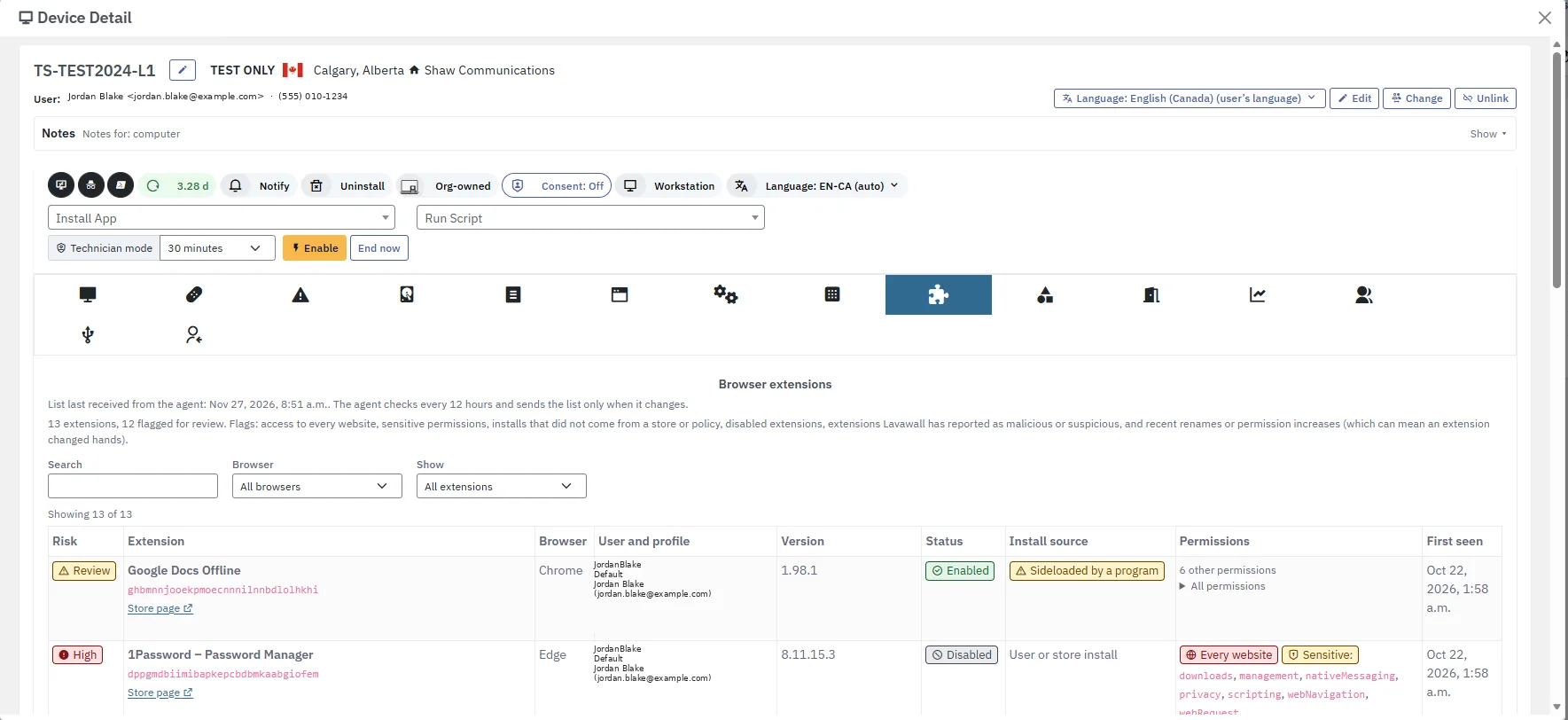
See it in the Lavawall® console
A real screen, shown with example data.
An extension is just another program, with more access
A browser extension can read and change every page someone visits, including the banking site, the webmail, and the internal admin console they have open in another tab. Most organizations have no inventory of what's installed, how it got there, or what it can see, because extensions install themselves quietly and rarely show up in a software audit.
Lavawall® treats extensions as the attack surface they are: a full, per-computer list, refreshed regularly, with the detail you need to tell a harmless productivity tool from something that shouldn't be there.
What flags an extension for review
Access to every website
A permission to read and change data on every site is the broadest an extension can ask for, and the one worth questioning first.
Sensitive permissions
Access to downloads, management, native messaging, privacy settings, scripting, web navigation or web requests is called out by name, not buried in a generic permissions list.
Sideloaded installs
An extension installed outside the browser's store or your own policy push is flagged, since that's a common path for unwanted software.
Disabled extensions
Still listed even when turned off, so a disabled-but-present extension doesn't quietly fall out of view.
Known malicious or suspicious
Extensions Lavawall has reported as malicious or suspicious are marked, drawing on what's been seen across the whole Lavawall fleet.
Recent renames or permission jumps
A sudden rename or a jump in what an extension asks for can mean it changed ownership, which is exactly when a trusted extension turns risky.
Filter by browser, user, or risk
Search across every extension on the computer, filter by browser, and show all extensions or only the ones flagged for review. Each row carries the extension's store page link, its version, its user and profile, when it was first seen, and the full permission list on demand, so a conversation with the person using it starts from facts rather than a guess.
Why it matters
A malicious or compromised browser extension sits between the person and every site they visit, which makes it one of the quietest ways to lose credentials, session cookies, or sensitive data. Extensions rarely show up in a vulnerability scan or an antivirus report, so without a dedicated inventory, they're effectively invisible until something goes wrong. Lavawall® closes that gap with the same per-computer detail you already expect from the rest of the console.
Common questions
- What does browser extension monitoring show?
- Every browser extension installed on a managed Windows computer, across the browsers it uses, with its permissions, install source, version, enabled or disabled status, and when it was first seen.
- How does Lavawall decide which extensions need a second look?
- An extension is flagged for review when it has access to every website, holds sensitive permissions, was sideloaded rather than installed from a store or pushed by policy, was recently renamed, or had its permissions increased, which can mean an extension changed hands.
- Does this replace antivirus or EDR?
- No. It is a visibility layer for browser extensions specifically, which most antivirus and EDR products don't inventory in detail. See AV, MDR, XDR and EDR coexistence for how Lavawall verifies your endpoint protection.
- Which browsers and platforms are covered?
- Chromium-based browsers such as Chrome and Edge on managed Windows computers. Coverage expands as new browsers and platforms are added.
- Can I block an extension from here?
- Not directly. This gives you the list, the risk flags, and who installed what, so you can act through policy, your browser management tooling, or a conversation with the person using the extension.