Referral Partners
Run a referral program: enrol partners, track the clients they refer, and see what you owe them.
What the page is for
Referral Partners is a page in the Lavawall® console, in the Marketing (MSP) area. Lavawall is the RMM, security, and compliance platform from ThreeShield, built and hosted in Canada. About this feature.
If other businesses send clients your way, this page tracks it. As a managed service provider, you enrol a company as a referral partner, set its commission terms, and record the clients it refers. Lavawall works out what each partner has earned from the eligible revenue of its referrals, and you record payments to see what is still owed.
Partners can also sign in and see their own view, My Referrals: the clients they referred, when each referral stops earning, and their earnings. They can submit new referrals and share invite links. A client who signs up with a partner's invite code becomes your client and is credited to that partner automatically.
What you see
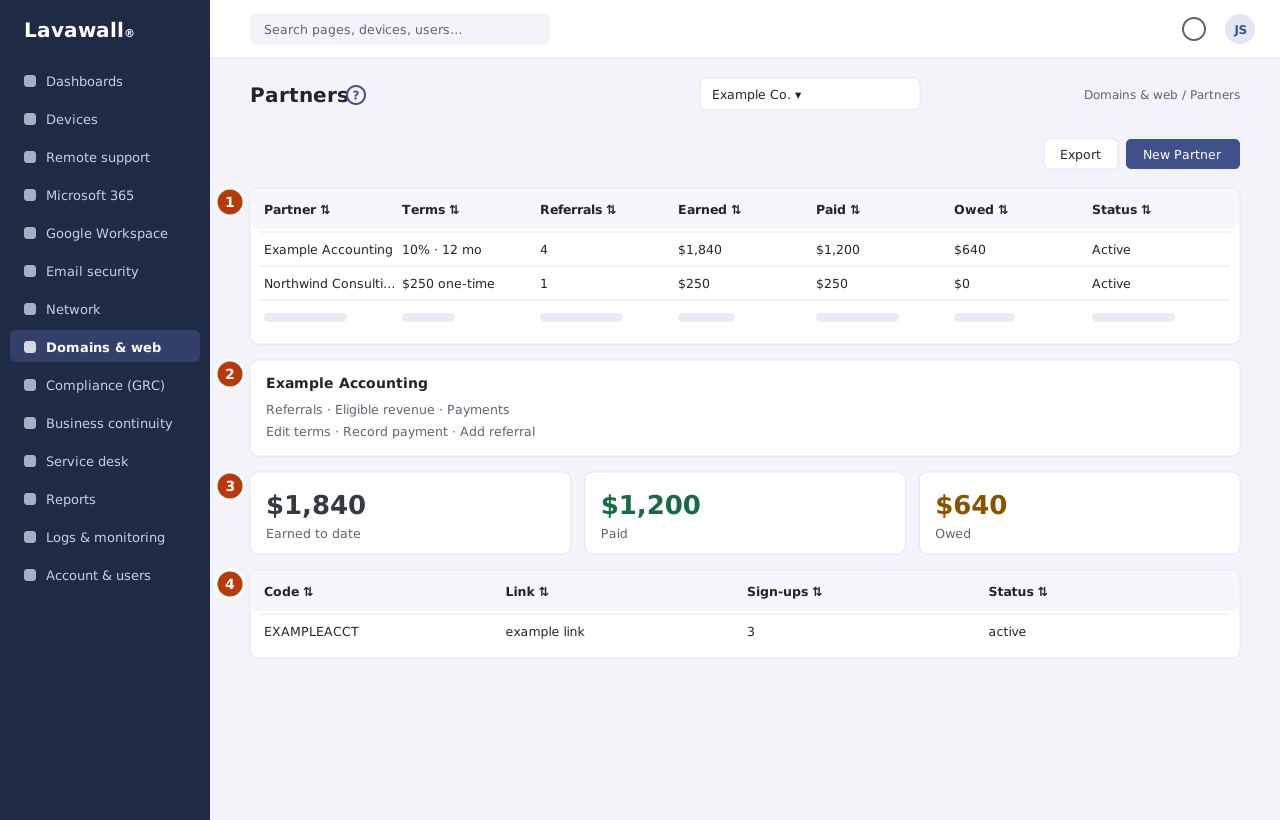
- Referral Partners (managed service providers): Partner, Terms, Referrals, Earned, Paid, Owed and Status, with Export and New Partner.
- Partner details: opened from a partner row: referrals, eligible revenue, payments, team users and invite codes, with Edit terms, Record payment and Add referral.
- My Referrals (partners): Earned to date, Paid and Owed, and a table of Client, Referred, Status, Client status, Eligible until, Revenue and Earned, with Refer a Client and Team access.
- My invite links: each Code, Link, Sign-ups and Status.
How to use this page
How to enrol a referral partner
- Select New Partner.
- In Organization, type part of the name to search your organizations and choose one. Only your active organizations that are not already partners are listed, 20 at a time; scroll down for more. Prospects are marked Prospect.
- If the organization is not in Lavawall yet, type its name and choose Enrol "…" as a new organization. Check the Name and, if you know it, add the Website domain (optional).
- Under Commission, tick one or more: a percentage Rate (%), a Recurring flat ($/invoice) amount, or a One-time ($) amount.
- Set the Eligibility window (months), add Notes and select Enrol.
- If a new organization looks like one you already have (the same name, a similar name or the same domain), it is listed instead of being added. Select Enrol this one to enrol the existing organization, or tick None of these is the same organization. Add it as a new one. and select Enrol again. An organization with exactly the same name can't be added twice.
How to record a referral and its revenue
- Open the partner.
- Select Add referral and choose the referred client. Leave the commission boxes unchecked to use the partner's default terms.
- In the referral's eligible revenue, select Add item to enter a Description and Amount ($), or Pull won deals to bring in won CRM deals.
- The commission is calculated for you. Enter a Commission override only if you need a different amount.
How to record a payment to a partner
- Open the partner and select Record payment.
- Enter the date, Amount, Method and Reference. Optionally apply it to one referral, or leave it at the partner level.
- Select Record. Paid and Owed update.
How to create an invite code
- Open the partner (or, as a partner, go to My invite links) and select New invite code.
- Enter a Code, or leave it blank to have one suggested, and a Label (only you see this).
- Choose Who bills the new client: Lavawall bills the client directly or Billed through us (the client's seats go on our account).
- Optionally set Maximum sign-ups and Expires on, then select Save.
- Share the link or code. Select Visits and sign-ups to see how it is being used.
How to refer a client (partners)
- On My Referrals, select Refer a Client.
- Enter the Company name, Website / domain, Phone and Contact name.
- Select Submit referral. If the company looks like an existing one, you see a "Heads up" and the referral is reviewed.
How to give teammates access (partner administrators)
- Select Team access.
- For each teammate, choose whether they can Refer, see Earnings or be an Admin who manages this list.
Tips
- Client status on My Referrals shows how each referred client is doing: Under review until the referral is accepted, then Lead, Prospect, Onboarding, Active client or Inactive, or Closed when it was not eligible. Partners see the name, dates and this status only, never anything else about your clients.
- A partner organization is a Prospect – partner (treated like a prospect, never in your client lists) or a Client – partner (a client that also refers). New organizations added from New Partner start as prospect-partners. Partner users have no access to your clients; they see only the partner portal.
- Referral fees are typically eligible for 12 months after the referral date, unless you set a different eligibility window.
- An organization added from New Partner joins your organizations as a prospect, with no users or devices. Its people can use the partner portal once you add them as users and give them access under Team access.
- A referral marked dup? may duplicate an existing client and is reviewed before it counts.
- Anyone signing up with an invite code is told, before anything is set up, that their organization will become your client and who bills them, and must agree to continue.
- Only an invite code that has never been used can be deleted. Disable a used code instead so its sign-up history is kept.
- Use Export to download the partner list as a spreadsheet.
Troubleshooting
- "No partner access"
- means your account is not set up for the referral program. Contact your provider.
- "No partners yet."
- Select New Partner to enrol one.
- "No matching organization. You can add it as a new one."
- None of your active organizations that aren't partners yet matches what you typed. Choose Enrol "…" as a new organization to add it, or check the spelling. An inactive organization is not listed; reactivate it first.
- "No users at this partner company."
- The partner has no users yet, so there is nobody to give team access to.
Related articles
Still need help?
Search the support centre, or contact our support team and tell us which page you were on:
- Chat now: use the chat button in the bottom-right corner of this page to reach our team right away. Where cookie consent is needed, the chat starts after you accept (cookie settings).
- Email: send our support team a message through the contact page. It goes straight to a person.
- Phone:
 AB: 1-403-538-5053
 US: 1-406-988-7333
 UK: +44 20 3695 9786
Names, companies, devices and figures in the pictures are examples. Other product and company names are trademarks of their respective owners.