Embed Branded Domain Scanner
Put a domain security scanner, a support chat and visitor logging on your own website, all branded to your company.
What the page is for
Embed Branded Domain Scanner is a page in the Lavawall® console, in the Marketing (MSP) area. Lavawall is the RMM, security, and compliance platform from ThreeShield, built and hosted in Canada. About this feature.
This page sets up the pieces of Lavawall you can place on your public website. The first is a white-labelled domain scanner: a visitor types in a domain, sees a live security scan branded to you, and is invited to contact you or book a meeting to fix what it finds.
The page also sets the branding on the PDF security reports you export, including a company name and logo, with optional overrides for individual client companies. Finally, it configures a chat widget for your website and visitor web logging, which records page views, referrers and time on page. The page gives you the code to paste into your site for each.
What you see
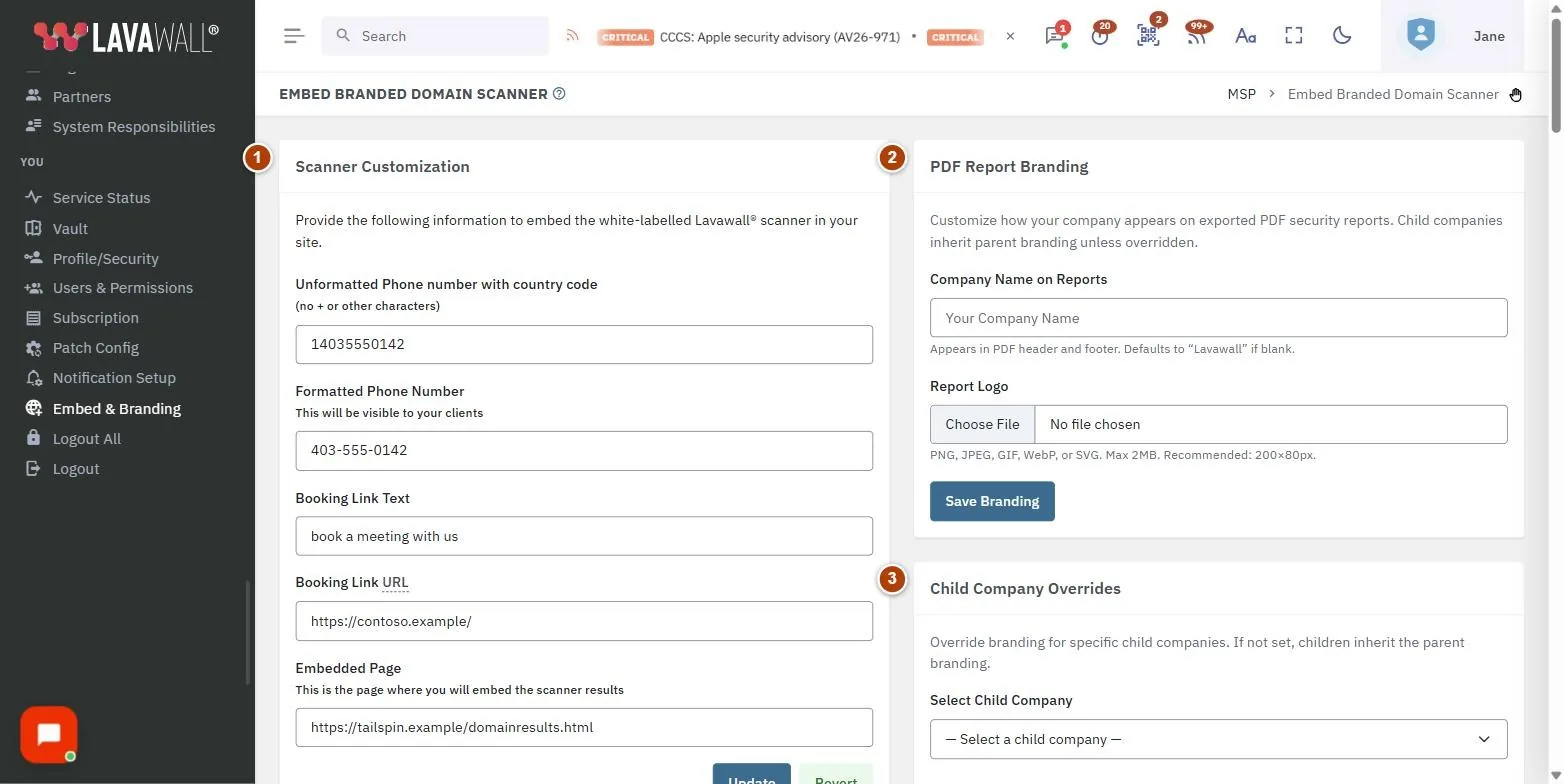
- Scanner Customization: phone numbers, Booking Link Text, Booking Link URL and Embedded Page, with Update and Revert.
- PDF Report Branding: Company Name on Reports, Report Logo and Save Branding, plus Child Company Overrides.
- Chat: widget title, colour, position, style, greeting and offline messages, Pre-Chat Form Fields, Offline notification email, switches to show the widget and enable visitor web logging, Save Settings and a Live Preview.
- Embed code and Allowed Domains: the chat and logging snippet with Copy, and the domains allowed to use it.
- Embed the Scanner in Your Website: the steps and code to add the scanner to a page on your site.
How to use this page
How to brand the scanner
- Under Scanner Customization, enter your Unformatted Phone number with country code (digits only) and the Formatted Phone Number your clients will see.
- Enter the Booking Link Text, such as "book a meeting with us", and the Booking Link URL. It must begin with https://.
- Enter the Embedded Page: the address of the page on your site where the scanner will appear. It must begin with https://.
- Select Update. Select Revert to discard unsaved changes.
How to add the scanner to your website
- Fill in Scanner Customization first.
- In Embed the Scanner in Your Website, if your site sets a Content Security Policy, add the Lavawall addresses listed.
- Copy the CSS into your page's head and the HTML and script into its body, using Copy.
- To start a scan automatically, link to your scanner page with "?domain=" and the domain, for example your-page?domain=example.com.
How to brand your PDF reports
- Under PDF Report Branding, enter the Company Name on Reports. If left blank, reports show Lavawall.
- Upload a Report Logo (PNG, JPEG, GIF, WebP or SVG, up to 2 MB; about 200 × 80 pixels works well).
- Select Save Branding.
- To brand reports differently for one client, choose it in Select Child Company, set a Company Name Override or Logo Override, and select Save Override. Select Clear Override to go back to your branding.
How to add a chat widget and visitor logging to your site
- In Chat, set the Widget Title, Button Colour, Position (Bottom Right or Bottom Left) and Button Style (Circle, Pill or Square).
- Write a Greeting Message and an Offline Message.
- For each of Name, Email and Phone in Pre-Chat Form Fields, choose Hidden, Optional or Required.
- Enter an Offline notification email so visitors' messages reach you when no technician is available. Separate several addresses with commas.
- Turn on Show chat widget on website and, if you want it, Enable visitor web logging. Select Save Settings and check the Live Preview.
- Select Copy beside the embed code and paste it just before the closing body tag on your site.
- Under Allowed Domains, add any extra domains or preview sites where the widget should work, and select Add domain.
Tips
- Subdomains of an allowed domain are allowed automatically. Add development or preview sites (for example on Cloudflare Pages or Netlify) separately.
- In the allowed domain list, own marks domains you own, and a shield marks verified domains.
- Child companies use your report branding unless you set an override for them.
- Visitor web logging results appear on the Visitor Web Log page.
Troubleshooting
- "Your security token was out of date, so nothing was saved."
- Another tab refreshed your session. Make the change again.
- "Booking link URLs must begin with https://"
- or "The embedded page URL must begin with https://": correct the address. Addresses cannot contain scripts or encoded characters.
- "Please provide a complete phone number and formatted phone number."
- Fill in both phone fields; each must be under 46 characters.
- "No domains configured: widget accessible from any domain."
- Add your domains to limit where the widget works.
- The scanner or chat does not load on your site.
- Check your site's Content Security Policy includes the Lavawall addresses shown.
Task guides that use this page
Related articles
Still need help?
Search the support centre, or contact our support team and tell us which page you were on:
- Chat now: use the chat button in the bottom-right corner of this page to reach our team right away. Where cookie consent is needed, the chat starts after you accept (cookie settings).
- Email: send our support team a message through the contact page. It goes straight to a person.
- Phone:
 AB: 1-403-538-5053
 US: 1-406-988-7333
 UK: +44 20 3695 9786
Names, companies, devices and figures in the pictures are examples. Other product and company names are trademarks of their respective owners.