DMARC Reports
See who is sending email as your domains, and which messages pass or fail SPF and DKIM checks.
What the page is for
DMARC Reports is a page in the Lavawall® console, in the Email security area. Lavawall is the RMM, security, and compliance platform from ThreeShield, built and hosted in Canada. About this feature.
Mail providers such as Google, Microsoft and Yahoo send daily DMARC reports to the address in your domain's DMARC record. Once you point that address at Lavawall on the DMARC Setup page, Lavawall receives and reads the reports for you and shows the results here.
Each row is a group of messages seen by one mail provider from one sending server, with the SPF and DKIM results and what the receiving server did with them. Rows that failed are highlighted, so you can spot legitimate services you still need to set up, and spoofing attempts by others.
Four figures across the top summarize the last 30 days.
What you see
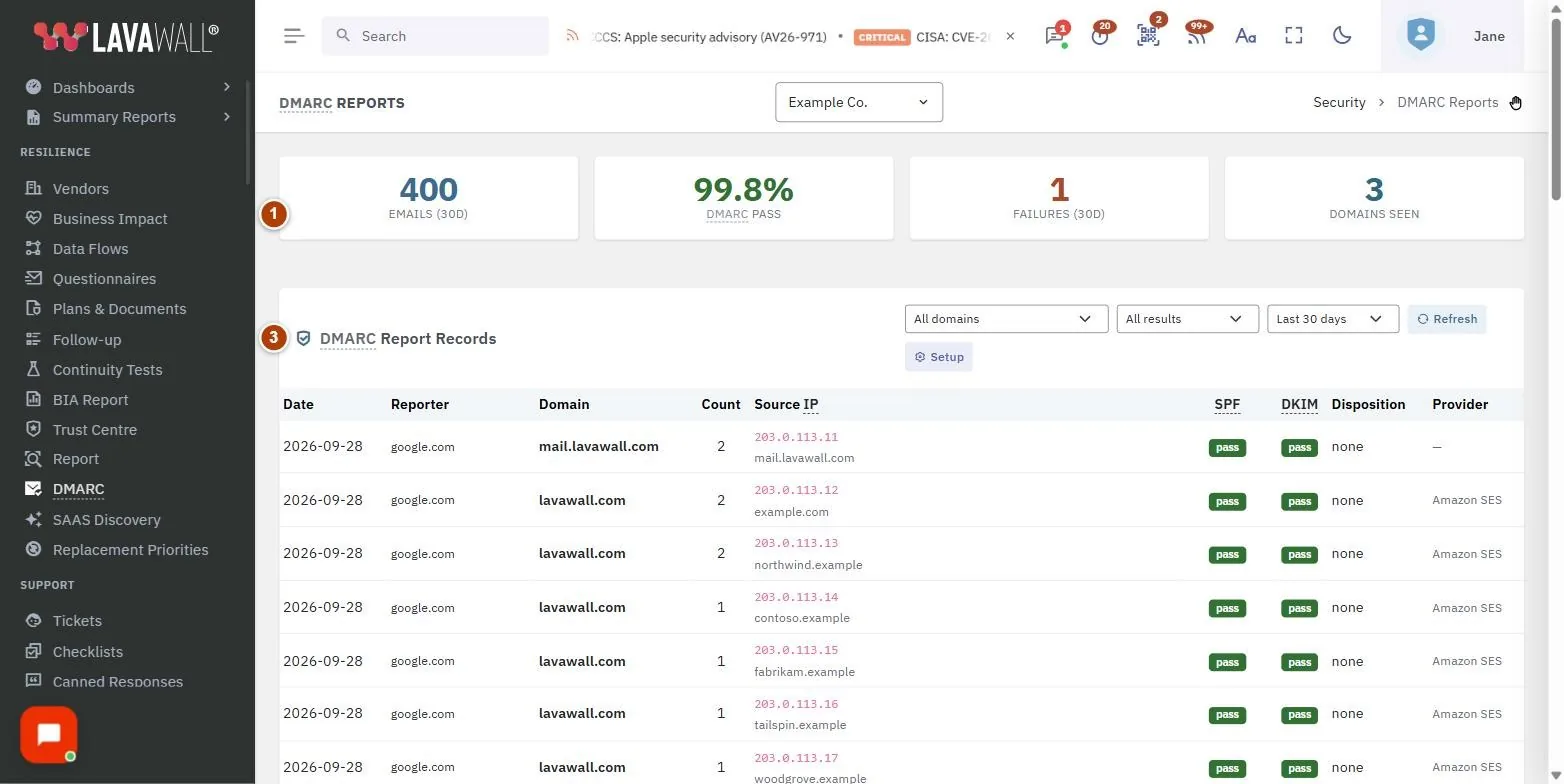
- Summary figures: Emails (30d), DMARC Pass, Failures (30d) and Domains Seen.
- Filters: All domains, All results (Failures only, Passes only), the time range (Last 7, 30 or 90 days), Refresh and Setup.
- DMARC Report Records: the table with Date, Reporter, Domain, Count, Source IP, SPF, DKIM, Disposition and Provider, with page numbers.
How to find failing mail
- Choose Failures only in the results filter.
- Look at Source IP and Provider to see who sent the mail.
- If it is a service you use (for example, a marketing or billing platform), set up SPF and DKIM for it. If not, it may be spoofing.
How to look at one domain
- Choose the domain in All domains.
- Change the time range if needed.
How to change the reporting address or settings
- Click Setup to open DMARC Setup.
Tips
- A green pass badge means the check passed. A red badge shows the failing result.
- Disposition shows what the receiving server did: delivered (none), sent to spam (quarantine) or rejected (reject).
- Reporter is the mail provider that sent the report, for example Google or Microsoft.
- Aim for a high DMARC Pass percentage before tightening your DMARC policy to quarantine or reject.
- The table shows 50 records per page.
Troubleshooting
- "No DMARC records found for the selected filters."
- Widen the time range or clear the filters. If you have just set up DMARC, reports usually arrive about a day later.
- No reports at all.
- Check on DMARC Setup that the receiver is enabled and that your DNS record includes your Lavawall address as rua.
- Reports from a provider are missing.
- If you entered Authorized Sending Domains on the setup page, reports for domains not on that list are rejected.
Related articles
Still need help?
Search the support centre, or contact our support team and tell us which page you were on:
- Chat now: use the chat button in the bottom-right corner of this page to reach our team right away. Where cookie consent is needed, the chat starts after you accept (cookie settings).
- Email: send our support team a message through the contact page. It goes straight to a person.
- Phone:
 AB: 1-403-538-5053
 US: 1-406-988-7333
 UK: +44 20 3695 9786
Names, companies, devices and figures in the pictures are examples. Other product and company names are trademarks of their respective owners.