Refresh prioritization
Be the hero who replaces the right computers first.
Lavawall® ranks every computer you manage by the signals that actually predict failure (age, battery wear, drive health, operating system support, TPM 2.0 readiness, and memory), so a refresh budget lands on the machines that are hurting users and security, not just the oldest ones on the asset sheet.
Start free, no credit card See the signals
Age · battery · drive health · OS support · TPM 2.0 · RAM
Understanding the refresh cycle
Most organizations base their hardware refresh timeline on tax depreciation, so a computer gets replaced when the accountant says it is fully written down. That number has nothing to do with whether the machine is still fit for work.
By the time a laptop is five years old it is usually too old. The battery has typically lost a large share of its capacity, the drive is more likely to be throwing errors, and the operating system may be sliding off vendor security support. Those are the conditions that generate tickets, lost hours, and risk, and none of them show up on a depreciation schedule.
Lavawall® scores condition instead of calendar age, so you replace the computers that are genuinely at the end of their useful life first.
The Replacement Prioritization Summary
The summary puts your whole fleet in one ranked view. Each device carries a score built from the signals below, and the worst offenders sit at the top. Yellow and red highlighting makes the machines that need attention obvious at a glance, whether you are looking at one office or every client you manage.
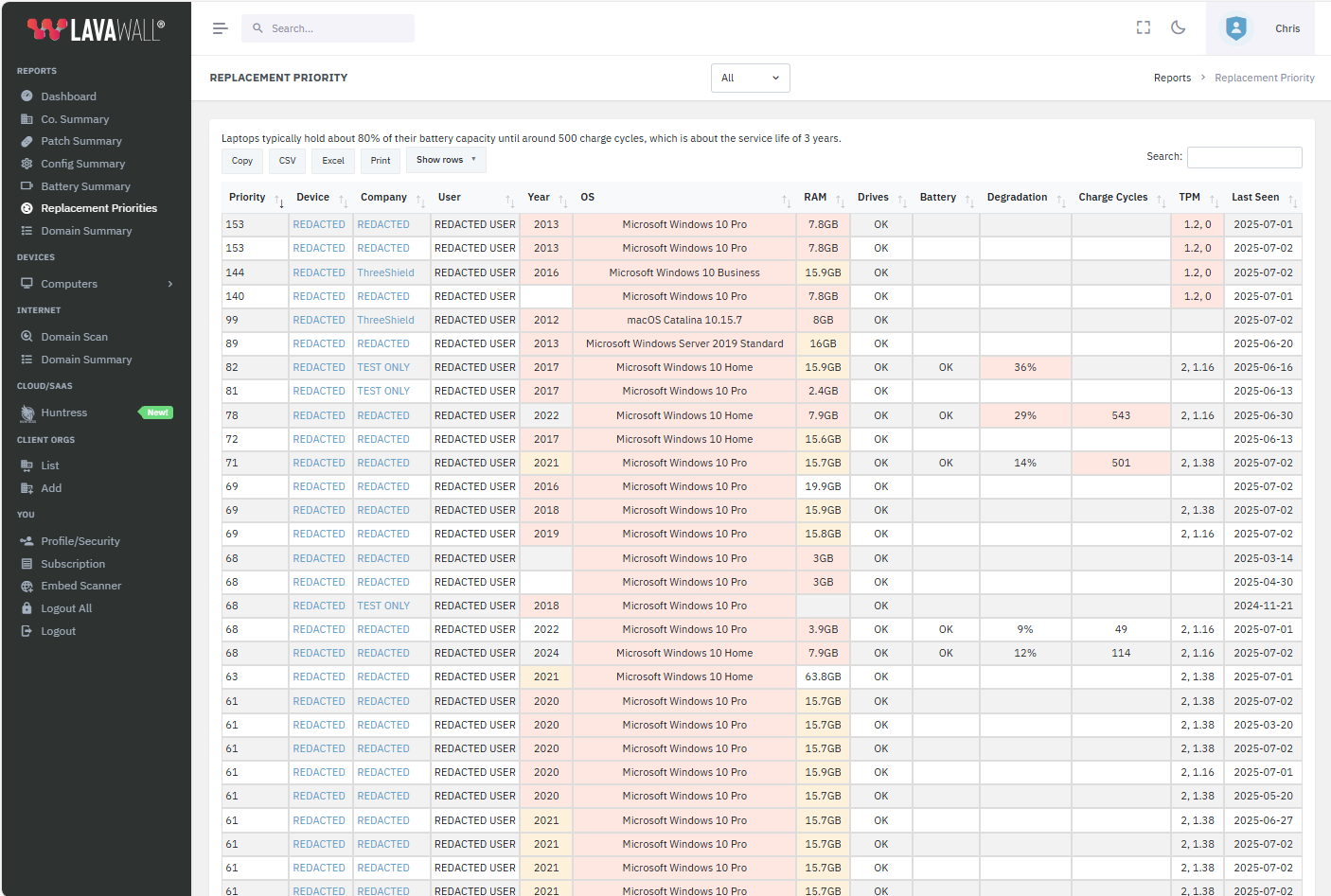
What Lavawall scores
Age
Devices over three, five, and eight years old are prioritized, with yellow highlighting as they age and red once they cross the oldest threshold.
Battery lifespan and capacity
Around three years or 500 charge cycles, batteries typically lose about 20 percent of their capacity. Lavawall tracks that wear so a fading battery counts toward replacement.
Drive health
Automatic and manual disk scanning surfaces storage that is starting to fail, before a dead drive turns into a lost-data emergency.
Operating system
Systems losing vendor support are highlighted in red and consumer editions in yellow, so upgrades and replacements can be planned together.
Trusted Platform Module (TPM)
Machines without a TPM 2.0 module are flagged, since they are not compatible with Windows 11 and will need replacing to move forward.
Memory (RAM)
Lavawall uses 32 GB as a baseline for business computers, flagging 8 GB in red and 16 GB in yellow so underpowered machines are easy to spot.
Drill into the details
The summary is fully clickable. Open any row to see the individual device and the readings behind its score, or move up to the company view to see how a whole fleet is ageing. That makes it easy to turn a ranked list into a concrete replacement plan and a budget conversation your client will accept, because every recommendation is backed by real condition data.
Frequently asked questions
- How does Lavawall decide which computers to replace first?
- Lavawall scores each device across several signals at once: age, battery wear, drive health, operating system support status, TPM 2.0 readiness for Windows 11, and installed memory. Devices with the most warning signs rise to the top of the list, so a budget refresh replaces the machines that actually put users and security at risk.
- Why is a five-year-old laptop usually too old?
- By five years a laptop has usually lost a large share of its battery capacity, is more likely to show storage errors, and may be dropping off vendor security support. Those are the failures that generate help desk tickets and downtime, which is why Lavawall scores condition instead of a fixed calendar age.
- Does it flag machines that cannot run Windows 11?
- Yes. Lavawall checks each device for a TPM 2.0 module and highlights systems that lack it. It also flags operating systems losing support in red and consumer editions in yellow, so you can plan upgrades and replacements together.
- Can I drill into a single device or company?
- Yes. The prioritization summary is clickable. Open an individual device to see the detail behind its score, or move up to the company view to see how a whole client fleet is ageing.