Microsoft 365
See the security of your Microsoft 365 tenant at a glance: incidents, users, MFA coverage, connected apps, storage and configuration score.
What the page is for
Microsoft 365 is a page in the Lavawall® console, in the Microsoft 365 area. Lavawall is the RMM, security, and compliance platform from ThreeShield, built and hosted in Canada. About this feature.
This is the starting point for Microsoft 365 in Lavawall. Once your tenant is connected, Lavawall monitors sign-ins, audit logs, and mail and file activity, and this page summarizes what it finds.
At the top, an incident strip shows how many incidents need action and links to the Breach Console. Below it, overview cards show your users (including risky, external and inactive accounts), how many people are protected by strong, weak or no MFA, how many connected apps have access and how many look risky, how full your storage is, which monitoring features are active, and a security configuration score.
Two expandable sections hold the detailed tools: Security posture & settings (configuration tests, permissions, impersonation protection, signatures and backups) and Investigate & manage (conditional access review, timelines, sign-in analysis, suspicious IPs, devices and account locks). Investigate & manage also holds the Geo Conditional Access Manager, which blocks sign-ins from countries the company does not work in.
MSPs can choose all companies to see a card for each client with incidents needing action, watchlist items, users, users without MFA, risky apps, score and storage.
What you see
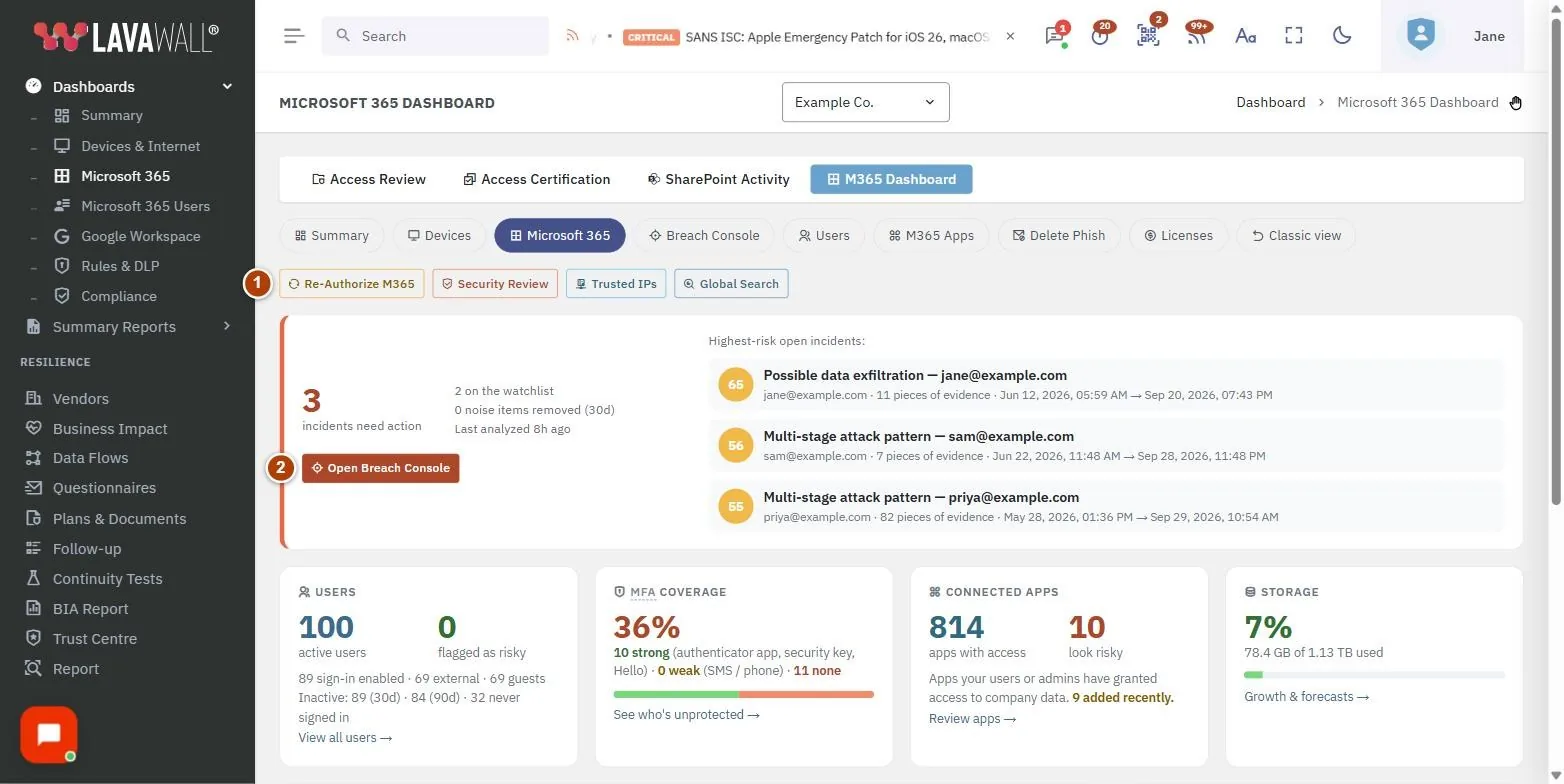
- Toolbar: Re-Authorize M365, Security Review, Trusted IPs and Global Search.
- Incident strip: incidents that need action, items on the watchlist, noise items removed in the last 30 days, the highest-risk open incidents, and Open Breach Console.
- Users: active users, users flagged as risky, sign-in enabled, external and guest accounts, and inactive accounts (30 and 90 days).
- MFA coverage: the percentage protected, split into strong, weak (SMS or phone) and none.
- Connected apps: apps with access, apps that look risky, and apps added recently.
- Storage: how much of your storage is used, with a link to growth and forecasts.
- Monitoring capabilities: which features are active: monitoring, response actions, configuration change monitoring, backup and rollback, Google Workspace, and breach detection.
- Security configuration score: how well the tenant's settings follow security best practices.
- Security posture & settings and Investigate & manage: expandable sections with detailed tools.
How to connect Microsoft 365
- If the page shows Microsoft 365 Not Connected, click Connect Microsoft 365.
- Choose Read Only (monitoring) or Read + Write (monitoring plus response actions such as locking accounts and revoking sessions).
- Sign in with a Microsoft 365 administrator account and accept the permissions.
How to act on what the dashboard shows
- If incidents need action, click Open Breach Console.
- Click a number on the Users card (for example flagged as risky or an inactive count) to open the matching list of users.
- Click none or weak on the MFA coverage card to see who is unprotected.
- Click the risky number on Connected apps to see the apps that look risky.
- Click Growth & forecasts on the Storage card.
- Expand Security posture & settings to review configuration tests and fixes.
How to search activity across the tenant
- Click Global Search.
- Search for a user, IP address or activity to see a timeline across sign-ins and audit events.
How to manage trusted IPs
- Click Trusted IPs.
- Add the IP addresses of your offices and known locations so sign-ins from them are treated as expected.
Tips
- Colours follow a simple rule: green is healthy, amber needs attention, red needs action. MFA coverage is green at 90% or more.
- If Response actions shows "needs Read+Write authorization", click Re-Authorize M365 and choose Read + Write.
- In the all-companies view, click a company name to open its dashboard.
- Times are shown in your browser's time zone.
Troubleshooting
- A banner says permissions granted to this tenant don't include everything needed.
- Click Re-Authenticate and accept the new permissions as a Microsoft 365 administrator.
- "No storage data synced yet."
- Storage figures appear after the first storage collection.
- "No Microsoft 365 Connections"
- in the all-companies view. Select a company and connect Microsoft 365.
- Security configuration score shows N/A.
- Configuration tests have not run yet for this tenant.
Task guides that use this page
Related articles
Still need help?
Search the support centre, or contact our support team and tell us which page you were on:
- Chat now: use the chat button in the bottom-right corner of this page to reach our team right away. Where cookie consent is needed, the chat starts after you accept (cookie settings).
- Email: send our support team a message through the contact page. It goes straight to a person.
- Phone:
 AB: 1-403-538-5053
 US: 1-406-988-7333
 UK: +44 20 3695 9786
Names, companies, devices and figures in the pictures are examples. Other product and company names are trademarks of their respective owners.