Build your first business impact assessment and continuity plan
Build your first business impact assessment, then generate your continuity plans and record a test.
A Lavawall® task guide: 8 steps across 8 console pages.
Before you start
- Who can do this: Anyone whose compliance (GRC) role includes viewing this page; adding, editing, deleting and exporting flows each need the matching compliance permission
- Plan: Resilience: Vendor Risk & Business Impact (add-on, or included in Professional and Complete). Resilience: Plans, Policies & Trust Centre (add-on, or included in Complete). See pricing.
- Where to start: open Data Flows in your console.
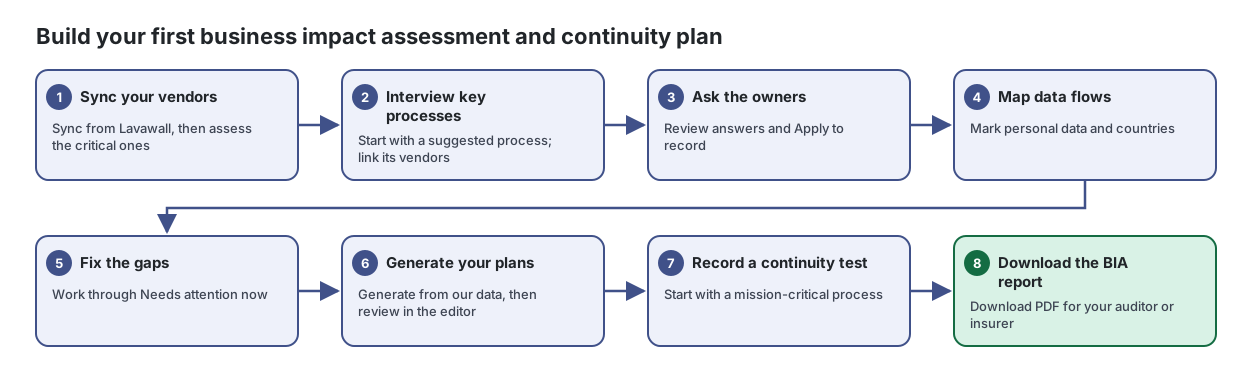
Steps
- Sync your vendors. Sync from Lavawall, then assess the critical ones
Keep one list of every service and supplier your business depends on, how much it hurts when they break, and what they know about you.
From the article: How to build your vendor list
- Select Sync from Lavawall. Vendors Lavawall has already detected are added, and the page tells you how many it found.
- Select Match known vendors to fill in trust-centre links and published certifications for recognised vendors.
- To add a vendor that was not detected, select Add Vendor.
- Interview key processes. Start with a suggested process; link its vendors
Work out which parts of the business matter most, how long each could stop, and what an outage would cost, in plain language and without jargon.
From the article: How to add a process
- Select Add a common process and pick a suggestion under Every business or Common for your industry, or choose Something else…. You can also select Interview a process to start from a blank form.
- On 1. The basics, fill in What should we call this?, a short description, the Department, and Who knows this process best? with Their email. If a staff directory is connected, you can search it to fill in the owner.
- On 2. How urgent?, choose how bad an outage would get and how fast, and optionally note when an outage would hurt most and who feels it.
- On 3. The numbers, choose how long until it must be running again, how much recent data you could afford to re-do, and the absolute limit before serious harm.
- On 4. The cost, rate how much it would hurt if it was down for an hour, a day and a week, tick the kinds of harm (for example money coming in, legal or compliance trouble, reputation, safety), and optionally estimate the cost of downtime.
- On 5. What it relies on, tick the vendors and tools it needs, and add anything else (a system, device, person, office or data set).
- More steps in the article
- Ask the owners. Review answers and Apply to record
Ask the people who actually do the work a few plain-language questions, then fold their answers into your business impact assessment.
From the article: How to review and apply answers
- Select Answered to see questionnaires with replies.
- Select View answers on the row.
- Read the answers. Select Apply to record and confirm Apply these answers?. Only empty fields are filled; nothing is overwritten.
- Copy anything else you want to keep by hand, then select Close.
- Map data flows. Mark personal data and countries
Document where your information moves, what is in it, how it is protected and which borders it crosses.
From the article: How to add a data flow
- Select Add a data flow (or Document the first flow if the list is empty), or pick one of the Suggested data flows.
- On 1. What moves?, enter What should we call this flow?, a one-sentence description, Where does it start?, Where does it go? and, optionally, which vendor it goes to.
- On 2. What is in it?, tick whether it includes information about people, credit card or payment details, or health information. Some boxes are pre-ticked from your earlier answers; untick any that are wrong.
- On 3. Protection & borders, choose How does it get there? and How often?, tick whether it is encrypted while it travels and where it is stored, and answer Does any of it leave the country?. If yes, enter the two-letter country codes, separated by commas.
- Choose Why are we allowed to share it? and enter How long does the destination keep it?.
- Select Save flow. Nothing is saved until you do.
- Fix the gaps. Work through Needs attention now
See everything in your business continuity records that is missing, out of date or contradictory, and fix it in one place.
From the article: How to work through the list
- Start with Needs attention now. Use the Urgency filter to show only those.
- Read What needs doing on each row.
- Select the Open the record button to go to the vendor, process, data flow or questionnaire and fix it there.
- Select Recheck to refresh the list after you make changes.
- Generate your plans. Generate from our data, then review in the editor
Generate your continuity and privacy documents from the business impact information you have already recorded.
From the article: How to generate a plan
- Check the progress tiles. If a count is low, add the missing information first (for example on Vendor Inventory or Business Impact Assessment).
- On the plan's card, select Generate from our data.
- When the page reloads, select Open in editor to review the document, make any edits and move it through approval in the Document Library.
- Record a continuity test. Start with a mission-critical process
Keep a record of every tabletop exercise and recovery test, and prove your recovery plans actually work.
From the article: How to record a test
- Select Record a test.
- Choose the Kind of test, enter a Title (for example "Q3 ransomware tabletop") and the Date of the test.
- Describe the Scenario (what was simulated and what the team had to do) and the Participants, including anyone who was missing but should have been there.
- Choose the Business process tested, or Not tied to one process. The Target RTO (hours) comes from the business impact assessment.
- Enter the Actual (hours) recovery time and the Outcome.
- Under Findings and actions, record what went wrong, what nobody knew, what will change and who owns it.
- More steps in the article
- Download the BIA report. Download PDF for your auditor or insurer
Produce a polished, auditor-ready business impact assessment report from the information you have already recorded.
From the article: How to download the report as a PDF
- Open BIA Report.
- Select Download PDF. Lavawall builds the PDF and your browser downloads it.
When you are done
You have a business impact assessment, continuity plans generated from it, a test on record, and a report for your auditor or insurer.
Articles for the pages in this guide
- Data Flows: Document where your information moves, what is in it, how it is protected and which borders it crosses.
- Follow-up: See everything in your business continuity records that is missing, out of date or contradictory, and fix it in one place.
- BIA Report: Produce a polished, auditor-ready business impact assessment report from the information you have already recorded.
- Business Impact Assessment: Work out which parts of the business matter most, how long each could stop, and what an outage would cost, in plain language and without jargon.
- Plans & Documents: Generate your continuity and privacy documents from the business impact information you have already recorded.
- Continuity Tests: Keep a record of every tabletop exercise and recovery test, and prove your recovery plans actually work.
- Stakeholder Questionnaires: Ask the people who actually do the work a few plain-language questions, then fold their answers into your business impact assessment.
- Vendor Inventory: Keep one list of every service and supplier your business depends on, how much it hurts when they break, and what they know about you.
Still need help?
Search the support centre, or contact our support team and tell us which step you are on:
- Chat now: use the chat button in the bottom-right corner of this page to reach our team right away. Where cookie consent is needed, the chat starts after you accept (cookie settings).
- Email: send our support team a message through the contact page. It goes straight to a person.
- Phone: AB: 1-403-538-5053, BC: 1-778-731-1339, ON: 1-289-724-8829, US: 1-406-988-7333, UK: +44 20 3695 9786.