Phishing simulation
Phishing simulations your staff learn from, not dread.
Lavawall® phishing simulation sends safe, realistic phishing emails to your own staff in Microsoft 365 or Google Workspace, shows each person who clicks the red flags they missed, and never records passwords. It is part of the Training & Phishing plan, C$1.95 / US$1.50 per user per month, for MSPs and internal IT teams.
Last updated
Start my free trial, no credit cardSee the Training & Phishing plan
Works with the Outlook Phishing Reporter · Microsoft 365 and Google Workspace · month-to-month
See it in the Lavawall® console
Real screens, shown with example data.
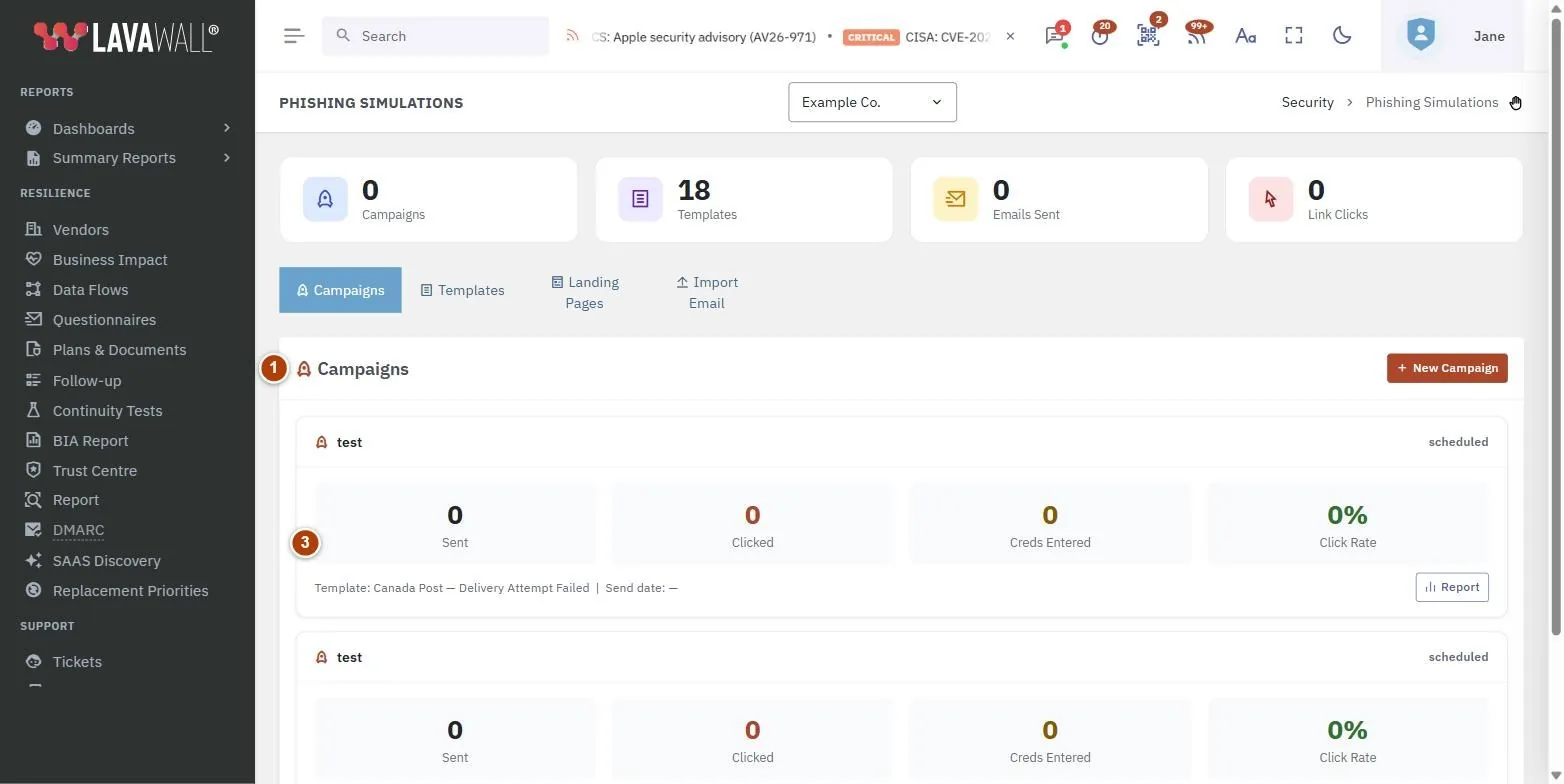
How a campaign works
- Pick a template from the library, or write your own.
- Choose the lesson page people see if they click, with the red flags listed.
- Choose who receives it: training groups, chosen people, or everyone.
- Send now or schedule it.
- Watch clicks, sign-in attempts and click rate, and get an email when someone clicks.
Templates for the lures your staff actually see
The library covers credential harvesting, IT helpdesk requests, invoice and CEO fraud, parcel delivery and Canada Revenue Agency lures, each rated Easy, Medium, Hard or Expert. Start easy, raise the difficulty as people improve, and write your own when you want a lure that matches a client's suppliers.
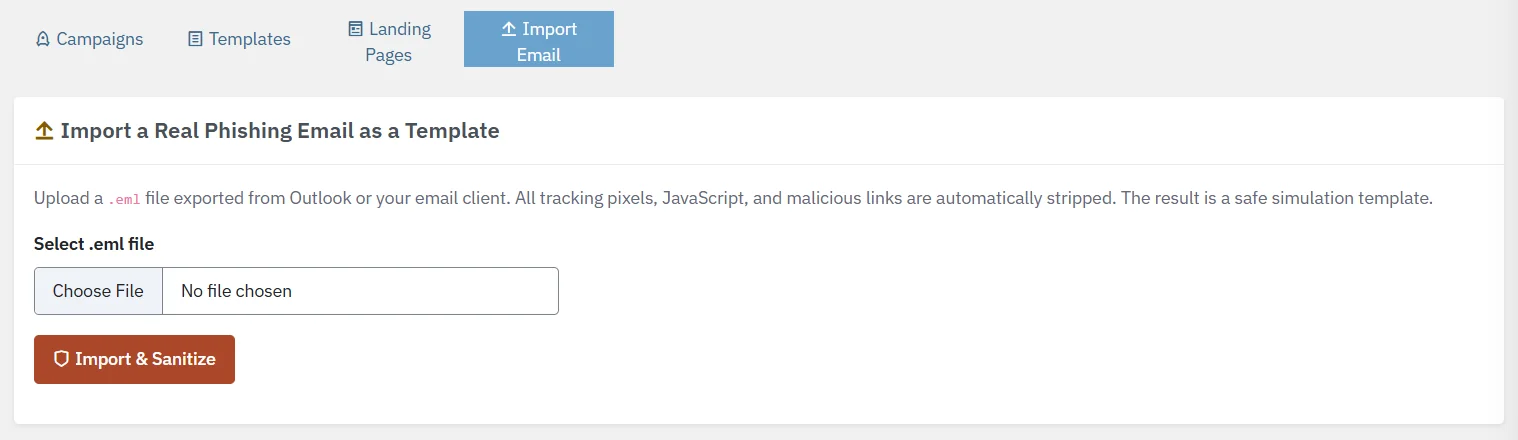
Turn a real attack into a lesson
When a convincing phishing email gets through, save it as a .eml file and import it. Lavawall turns it into a safe simulation template: every link leads to your lesson page, so nobody can reach the real site. Staff then practise on the lures aimed at them.
Passwords are never recorded
A simulation can show a fake Microsoft 365 or Google sign-in page to see who would have signed in. What people type stays in their own browser. Lavawall notes only that Sign in was pressed, never the password or its length.
Alerts and digests, per client or rolled up
Send an email the moment someone clicks, and a daily, weekly or monthly digest of clicks and training completion. MSPs can roll every client into one digest with a section per client, and a client's report never includes another client's information.
Reporting a test is rewarded
The Phishing Reporter add-in for Outlook recognises Lavawall simulations, so the person who reports one hears straight away that they caught it. Reports of real messages get plain-English risk feedback.
| Question | Lavawall |
|---|---|
| Does it work in Microsoft 365 and Google Workspace? | Yes, both. |
| Can you import a real phish? | Yes, from a .eml file, with links made safe. |
| What does a fake sign-in page keep? | Only that Sign in was pressed, never the password or its length. |
| Can an MSP roll up every client? | Yes, with a section per client. |
| Is training in the same plan? | Yes, 556 courses by industry, region and role. |
| Contract term? | Month-to-month. |
Price
C$1.95 / US$1.50 per user per month for the Training & Phishing plan: phishing simulations, security awareness training, the Phishing Reporter, email and PDF analysis, and certificates with CPE time tracking. Subscribe on its own or add it to any plan. Included in Complete.
Frequently asked questions
What is a phishing simulation?
A phishing simulation sends a safe, fake phishing email to your own staff to see who clicks and who would sign in on a fake page, then shows each person the red flags they missed. Run regularly, the click rate shows whether security awareness training is working.
How much does Lavawall phishing simulation cost?
Lavawall phishing simulation is part of the Training & Phishing plan at C$1.95 / US$1.50 per user per month, month-to-month. Subscribe to the plan on its own or add it to any plan; it is included in the Complete tier.
Does Lavawall record passwords typed into a simulated sign-in page?
No. What a person types stays in their own browser. Lavawall notes only that Sign in was pressed, never the password or its length.
Can I turn a real phishing email into a simulation in Lavawall?
Yes. Save the email as a .eml file and import it. Lavawall turns it into a safe template, and every link leads to your lesson page, so nobody can reach the real phishing site.
Does Lavawall phishing simulation work with Google Workspace?
Yes. Lavawall delivers simulations to Microsoft 365 or Google Workspace mailboxes, and the optional simulated sign-in page can look like either service.
What happens when someone reports a Lavawall phishing simulation?
The Lavawall Phishing Reporter add-in for Outlook recognises the simulation and tells the person right away that they caught a test, so reporting is rewarded instead of ignored.
Can an MSP see phishing simulation results for every client in Lavawall?
Yes. Click alerts and daily, weekly or monthly digests can cover every client organization in one roll-up with a section per client, and a client's report never includes another client's information.
Which compliance requirements does phishing simulation help with?
Security awareness requirements that call for phishing education or testing, such as PCI DSS v4.0.1 requirement 12.6.3.1, ISO/IEC 27001:2022 control A.6.3, NIST CSF 2.0 PR.AT-01 and CMMC Level 2 practice AT.L2-3.2.1. Lavawall GRC keeps the results as dated evidence.
Try phishing simulation on your own staff
Start my free trial, no credit cardSee the Training & Phishing plan