Ubiquiti UniFi monitoring
Your network controller is an unwatched admin plane
Lavawall® turns a UniFi controller's admin, backup, and access changes into prioritized indicators of compromise, the moment they happen. It polls each controller on your schedule, diffs the admin roster, backups, and event stream against the last known-good snapshot, and raises a severity-ranked notification to your console, email, or PSA. Agentless, multi-tenant, and MSP-ready.
Start free, no credit card See how it works
Agentless · multi-tenant · local or cloud API · UniFi OS and legacy controllers
See it in the Lavawall® console
Real screens, shown with example data.
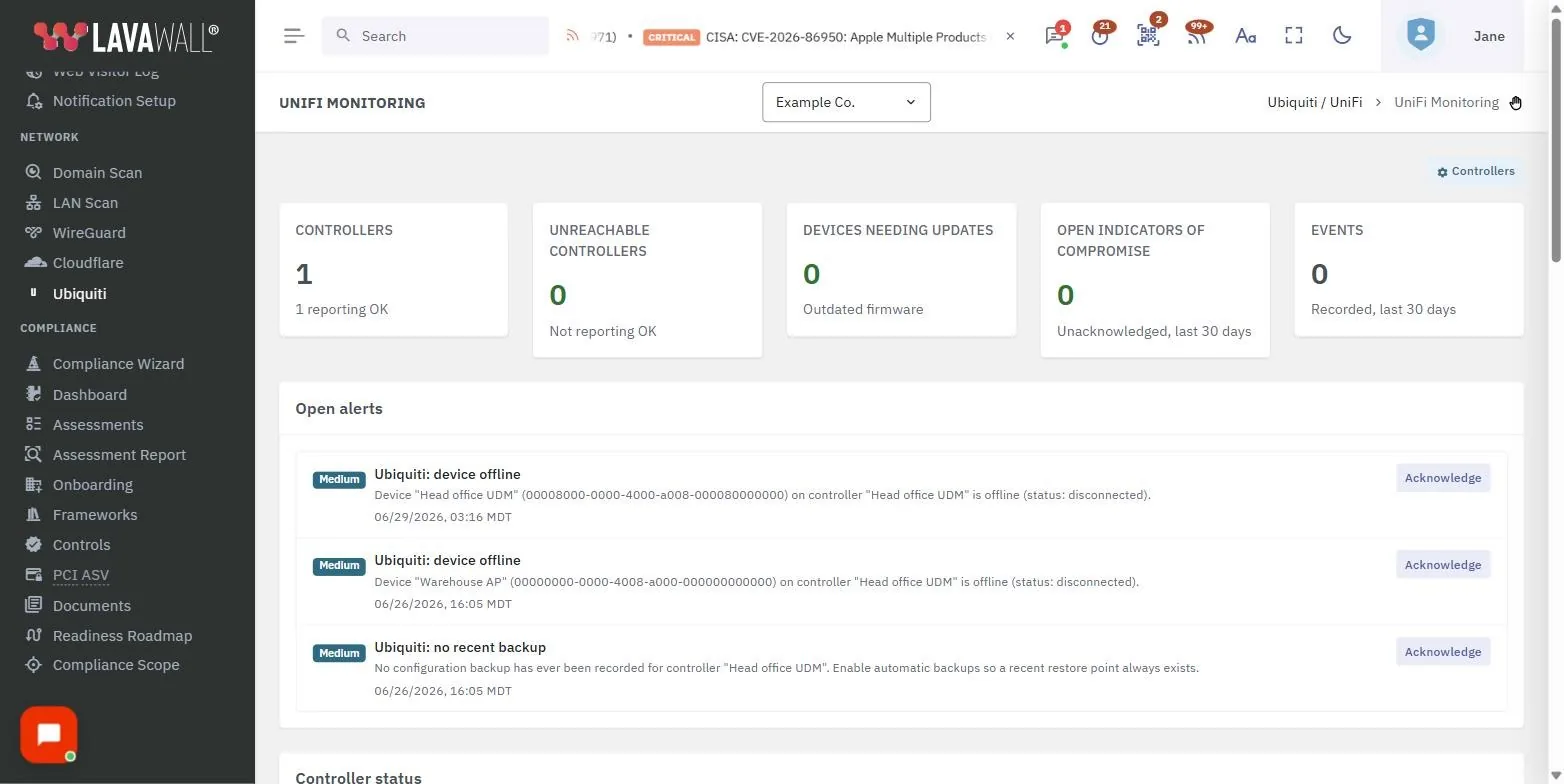
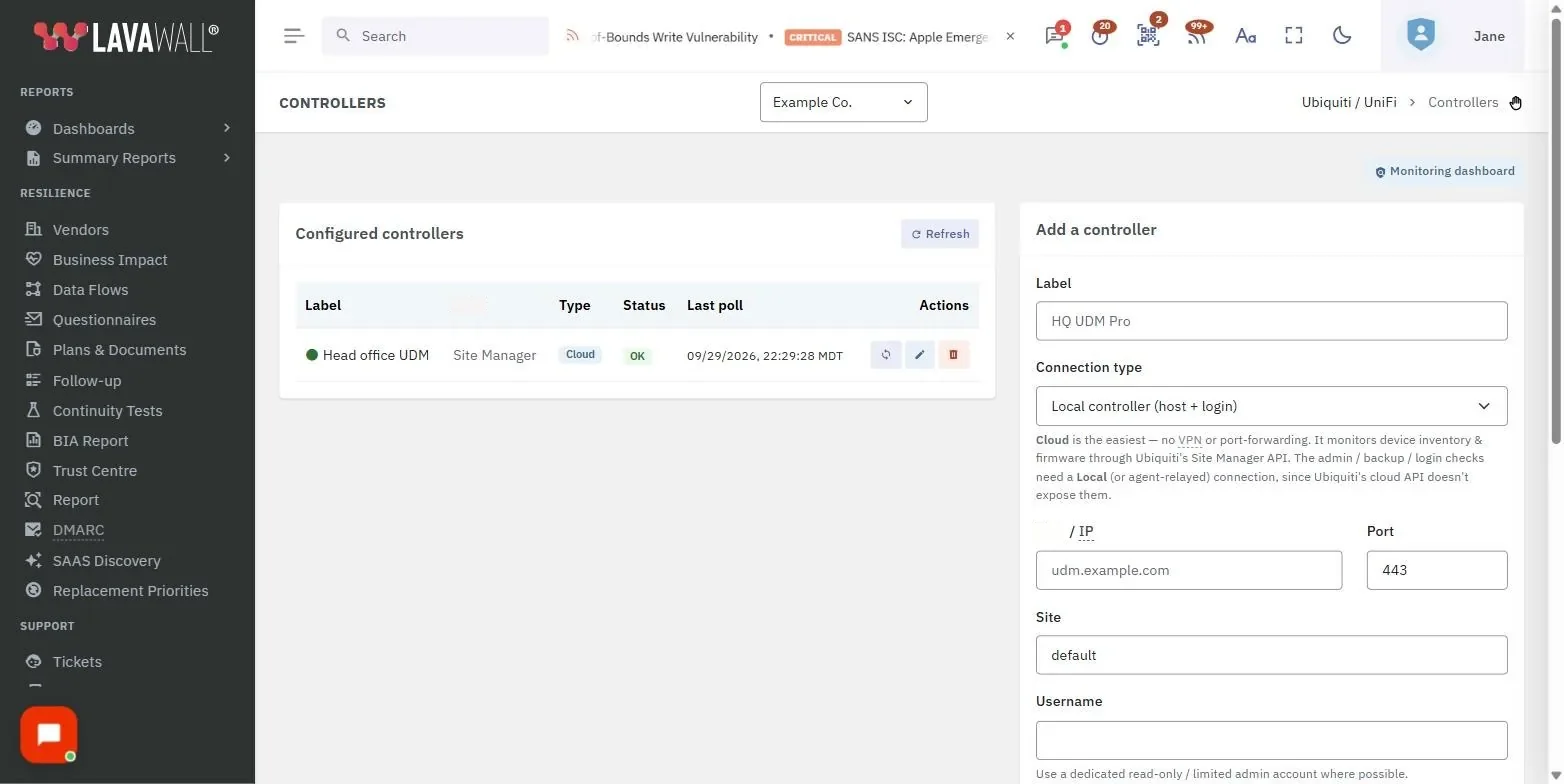
The keys to the network, and almost nobody is watching them
A UniFi controller holds every VLAN, firewall rule, VPN, and remote tunnel on the network. Yet it is often left out of routine monitoring. An attacker who reaches the controller does not need malware. They just add an admin, flip on remote access, and walk out with a configuration backup. Years after a forgotten edge appliance seeded a major password-manager breach, the devices running the network are still easy to overlook.
The Lavawall® UniFi monitor closes that gap. It is agentless, so nothing is installed on the controller and Lavawall® connects with a scoped admin account you control. It is multi-tenant, so every controller is scoped to one client and surfaced alongside your endpoint, cloud, and identity signals. It stays quiet until it matters, because the first poll baselines silently instead of flooding you. It supports UniFi OS (UDM, UDM Pro, Cloud Key Gen2 and later) and legacy self-hosted Network controllers.
Every change becomes a notification
Lavawall® ranks each finding by severity so your queue reflects risk, not noise. De-duplication means a single ongoing condition is one item, and indicators close themselves automatically when the condition is reversed. Severity bands run Critical, High, Medium, and Operational. A permission change that creates a new super-admin is escalated to Critical automatically, as is any admin matching your known-bad watchlist. Operational items cover availability: device outages, WAN failures, and controllers Lavawall® cannot reach.
Detectable indicators include:
- New admin added
- Admin promoted to super-admin
- Suspicious admins (watchlist match)
- Admin login from a flagged location
- Access or permission change
- Admin login from a new IP
- Remote or cloud access enabled
- Firewall or port-forward changed
- Firmware downgrade
- Admin removed
- Risky configuration (SSH, remote management)
- Threat management (IPS/IDS) disabled
- Outdated firmware or pending update
- New configuration backup
- No recent configuration backup
- Device offline or outage
- Internet uplink (WAN) down
- Controller unreachable or auth failed
Beyond the admin roster: config, posture, and uptime
Adding an admin is only one way to weaken a network. Lavawall® also watches the settings an attacker (or a rushed change) can turn against you, and the availability signals that tell you a site is in trouble.
- Firewall and port-forward change detection. Every poll fingerprints the controller's firewall rules and port-forward table. Open a port or alter a rule and you get a notification. The first baseline is silent, so only real changes fire.
- Security-posture checks. SSH access, remote and cloud management, automatic backups, and IPS/IDS threat management are surfaced as a posture panel, so a controller drifting out of a hardened state is visible at a glance and raised as a finding when it matters.
- Configurable IoC watchlist. Flag your own known-bad admin names, default and backdoor accounts (for example ubnt, superadmin, backupadmin), anonymous-mail-provider admins, and logins from bad IP ranges, or restrict admin logins to an allow-listed set of networks.
- Backup hygiene, both directions. A surprise backup is treated as possible exfil staging. An absent backup (nothing in 7 or more days) is flagged as a reliability gap. You can also trigger an on-demand encrypted backup straight from the console.
- Device and uplink uptime. Device-offline outages and downed WAN or internet uplinks raise reliability alerts that close themselves the moment service recovers. Per-device CPU and memory round out the health picture.
Cross-tenant alerts and firmware status
Get a view of all open alerts across every client tenant at once. Worried about a malicious user being added, a login from an unexpected place, or a new account you did not create? Your UniFi indicators of compromise are covered at a glance, with proactive notifications so you hear about them without going looking.
The same applies to firmware. When a new controller CVE lands, the question is always which device is outdated. With Lavawall® you would already have had a notification the moment a device fell out of date, so it never becomes a scramble. At a glance, the device firmware update section confirms your Ubiquiti fleet is current across all tenants on one screen.
How it works
1. Connect
Point Lavawall® at a UniFi OS or legacy controller with a scoped, limited admin account. The credential is encrypted at rest (AES-256-GCM) and kept off the web tier.
2. Baseline and diff
The first poll records admins, backups, and events without firing alerts. Every cycle after that compares live state to the snapshot and isolates exactly what changed.
3. Rank, route, resolve
Findings become severity-scored, de-duplicated indicators routed to the console, email, and your PSA, and they self-close when reversed.
Security first: least privilege, encrypted, on-box
- Encrypted credentials. Controller passwords are stored with AES-256-GCM. The key is stored separately, and the password is never returned to the browser.
- Local-only monitoring service. The monitor accepts connections only from its own server, so nothing it exposes is reachable from outside.
- Per-tenant isolation. Every request is limited to the client you are working in, so one client's controllers can never be read or touched from another tenant.
- Use a limited account. A read-only or limited admin on the controller is enough for monitoring, with no super-admin required.
How the Lavawall® UniFi monitor compares
| Capability | Lavawall® UniFi monitor | Typical RMM | UniFi built-in alerts |
|---|---|---|---|
| Multi-tenant firmware status on one screen | Yes | No | No |
| Detects a newly added controller admin | Yes, roster diff every poll | No | Limited, email only |
| Flags admin promoted to super-admin | Yes, auto-escalated to Critical | No | No |
| Flags watchlist and known-bad accounts | Yes, auto-escalated to Critical | No | No |
| Surprise configuration backup created | Yes, treated as possible exfil | No | No |
| Remote or cloud access silently enabled | Yes | No | No |
| Firmware downgrade to a vulnerable build | Yes | No | No |
| Admin login from an unfamiliar IP | Yes, per-account detection | No | Partial |
| Firewall rule or port-forward change | Yes, fingerprint every poll | No | No |
| Security posture (SSH, IPS/IDS, auto-backup) | Yes, hardening panel plus alerts | No | No |
| No recent configuration backup | Yes, flagged after 7 days | No | No |
| Device offline or WAN-down uptime alerts | Yes, auto-closes on recovery | Varies | Per-site |
| Agentless via local or cloud Site Manager API | Yes, both supported | No | No |
| Severity ranking and de-duplication | Yes | No | No |
| Correlated with endpoint, cloud, and identity | Yes, one console | No | No |
Part of the bigger picture
UniFi monitoring sits alongside the rest of Lavawall®, so a rogue network admin shows up next to your endpoint, cloud, and identity signals rather than in yet another portal. Edge changes correlate with the same ranked, de-duplicated queue as your unified MDR detections and your configuration vulnerabilities, and change-monitoring becomes audit-ready evidence across over 160 frameworks in GRC and compliance.
Frequently asked
- Do I need to install anything on the UniFi controller?
- No. Monitoring is fully agentless. Lavawall® connects to the controller's API with an admin account you provide, and a read-only or limited admin is enough.
- Does it work with a UDM, UDM Pro, or Cloud Key, or only self-hosted controllers?
- Both. UniFi OS devices (UDM, UDM Pro, Cloud Key Gen2 and later) and legacy self-hosted Network controllers are supported. You pick the type when adding the controller. The default port is 443 for UniFi OS and 8443 for legacy.
- Will I get flooded with alerts when I first connect a controller?
- No. The first poll records the current admins, backups, and events as a silent baseline. Notifications only fire on changes after that, and a single ongoing condition is de-duplicated into one item that self-closes when reversed.
- How are the controller credentials protected?
- They are encrypted at rest with AES-256-GCM. The encryption key is stored separately, the password is never sent back to the browser, and the monitoring service accepts connections only from its own server.
- Does it connect locally, or through Ubiquiti's cloud?
- Either. Lavawall® can poll a controller directly over its local Network API, or read your fleet through Ubiquiti's cloud Site Manager API with a read-only key. The local path sees the most detail (admins, posture, firewall and port-forward, backups), while the cloud path covers inventory, firmware, and reachability.
- Does it cover uptime as well as security?
- Yes. Device outages and downed WAN or internet uplinks raise reliability alerts that auto-close when service is restored, and a controller with no backup in over seven days is flagged. Per-device CPU and memory are shown alongside firmware status.
- How quickly are changes detected?
- You set the poll interval per controller (minimum 60 seconds, with 5 minutes a sensible default). Each poll diffs live state against the stored snapshot.