Free Domain Scan
Get a quick, free overview of a domain's website, email and DNS security, without signing in.
What the page is for
Free Domain Scan is a page in the Lavawall® console, in the Domains & web area. Lavawall is the RMM, security, and compliance platform from ThreeShield, built and hosted in Canada. About this feature.
The free Domain, Web and Email Scan lets anyone check a domain from the outside. It reviews the domain's registration and DNS, open ports, encryption, website security, email spam and phishing protection, web application firewall, content management system, reputation, known vulnerabilities and server patch level, and shows the results with a summary and total error count.
Without an account, a domain can be scanned again only after a waiting period, and sensitive administrative services are not tested. Signing in or joining Lavawall gives full details, more frequent scans, notifications and computer security information.
What you see
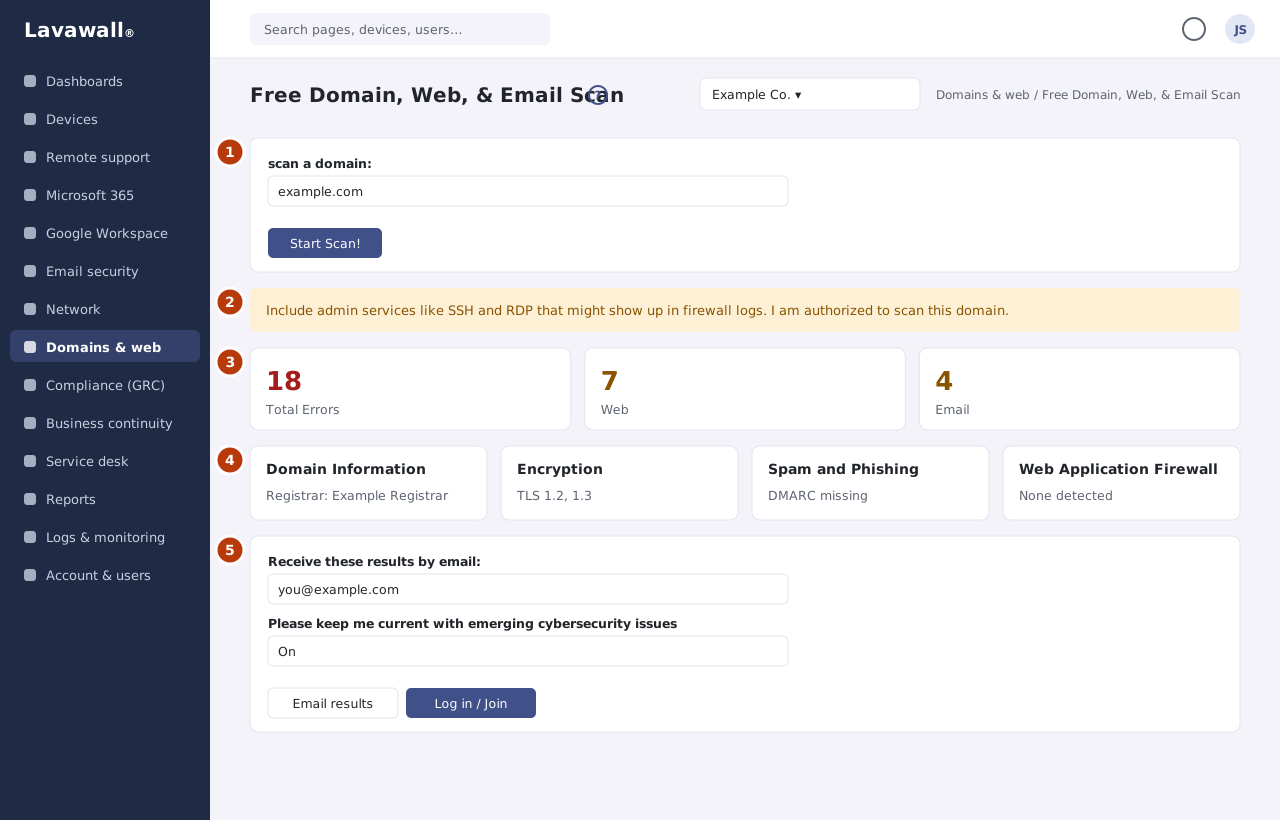
- Scan a domain: the domain box and Start Scan! button.
- Admin services option: a switch to include admin services like SSH and RDP, confirming you are authorized to scan the domain.
- Overview: Total Errors and missing protection across Web and Email.
- Result sections: Domain Information, Open Ports, Encryption, Web Security, Domain Security, Spam and Phishing, Web Application Firewall, Content Management, Domain Reputation, Vulnerabilities, Server Patches and Organization Controls.
- Email results and join: Email results and Log in / Join.
How to use Free Domain Scan
How to run a free scan
- Type the domain, for example example.com.
- Click Start Scan!.
- Review the Overview and each result section as it completes.
How to get the results by email
- Enter your email address under Receive these results by email.
- Leave Please keep me current with emerging cybersecurity issues ticked if you want updates.
- Complete the short "I'm human" check below the email box. Usually it ticks itself.
- Click Email results.
How to get full details
- Click Log in / Join.
- Once signed in, scan from Domain Scan Results for full details, admin service checks and monitoring.
Tips
- Only scan domains you own or are authorized to scan.
- Turning on the admin services option includes checks that may appear in the domain owner's firewall logs.
Troubleshooting
- "Please complete the "I'm human" check, then send again".
- Wait for the check below the email box to finish, then click Email results again.
- "Your page security token could not be refreshed".
- Reload the page and try again. This can happen if the page was left open for more than two hours.
- "Too many emails were sent for this domain today" or "to this address today".
- Results can be emailed a few times a day per domain and per address. Try again tomorrow, or sign in to see the full results.
- "Invalid Domain".
- Enter a domain name only, such as example.com.
- "Please use a valid email address".
- Check the address before clicking Email results.
- The domain cannot be scanned again yet.
- Free scans of the same domain are limited. Log in or join for more frequent scans.
Related articles
Still need help?
Search the support centre, or contact our support team and tell us which page you were on:
- Chat now: use the chat button in the bottom-right corner of this page to reach our team right away. Where cookie consent is needed, the chat starts after you accept (cookie settings).
- Email: send our support team a message through the contact page. It goes straight to a person.
- Phone: AB: 1-403-538-5053, BC: 1-778-731-1339, ON: 1-289-724-8829, US: 1-406-988-7333, UK: +44 20 3695 9786.
Names, companies, devices and figures in the pictures are examples. Other product and company names are trademarks of their respective owners.