Datto RMM
Using Datto RMM today? Start Lavawall with a component.
Lavawall® is a multi-tenant RMM and remote support platform for MSPs and IT teams, with patching, security monitoring, Microsoft 365 and Google Workspace breach detection, and compliance built into the same agent and console. Its ready-made Datto RMM component is the fastest way to get that agent onto computers you already manage.
Import the Windows or Mac component, run it as a job on one site first, and start with the features you need most while both agents work side by side.
Start a 14-day free trialSee the component setup
14-day trial of the full platform, no credit card. Then month-to-month, with no long-term contract and no high-water-mark billing.
See it in the Lavawall® console
Real screens, shown with example data.
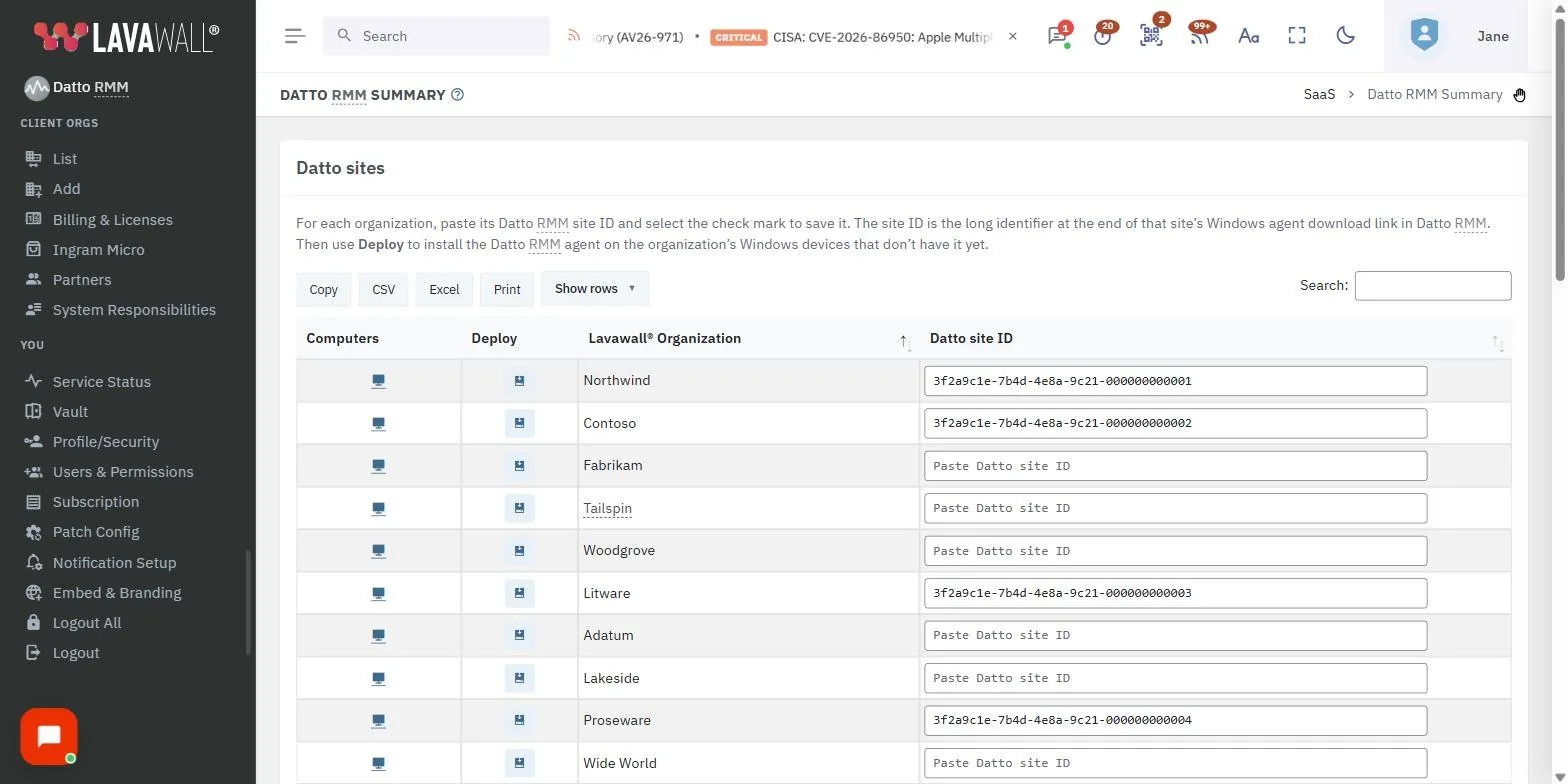
How to install Lavawall® through Datto RMM
Datto RMM uses downloadable components rather than a pasted script. Lavawall® ships a Windows component and a Mac component (.cpt files). Setup takes minutes.
Site variable (MSP and Audit accounts)
- Get your authentication code from the Lavawall® console.
- In Datto RMM, create a site variable named LAVAWALL_KEY and set it to that code. This step is only required for MSP and Audit accounts.
Windows agent
- Download the Windows .cpt component from Lavawall®.
- Import the component into Datto RMM's Automation section.
- Create a deployment job targeting one site first, such as your own office, and add more sites once you have seen it work.
- Run the job as the system account.
Mac agent
Follow the same steps using the Mac-specific .cpt component. macOS asks the user to allow screen and audio access; our Mac setup guide shows what to click.
The other direction
You can also deploy Datto RMM agents from Lavawall®: copy a Site GUID out of Datto RMM and paste it into the Lavawall® console under CLOUD/SAAS, then Datto RMM.
Start a 14-day free trialTalk to a human
14-day trial of the full platform, no credit card. Then month-to-month, with no long-term contract and no high-water-mark billing.
What you get once the agent is installed
- Browser-based remote control of Windows and Mac computers, including from a phone, with the Admin Workspace for fixing problems without disturbing the user, and ad-hoc support for computers without the agent.
- Patching for more than 7,400 applications on Windows, Mac, and Linux, with process, performance, event log, and battery-health monitoring.
- Microsoft 365 and Google Workspace breach detection, and Microsoft 365, Entra, and Azure configuration backup and rollback.
- Compliance evidence collected automatically from the RMM for over 75 frameworks, including CMMC 2.0, HIPAA, SOC 2, and ISO 27001.
- Administrator elevation for Windows, a password vault, help desk, CRM, and website chat.
Lavawall® reads directly from the computer and from your Microsoft 365 and Google Workspace tenants, so what you see does not depend on what another tool happens to inventory.
Security questionnaires become a lookup, not a fire drill
GRC (compliance management) and RMM are tightly integrated in Lavawall®, and each can be used on its own. When a client questionnaire, a cyber-insurance renewal, or a SOC 2 or CMMC assessment asks for patch status, disk encryption, endpoint protection, and administrator rights on every computer, the RMM has been collecting that all along. The GRC module turns it into dated evidence for that company, so you look up the answer instead of gathering screenshots from several tools and rebuilding a spreadsheet.
Need compliance first? Start with GRC and turn on the RMM when you are ready.
Moving from Datto RMM to Lavawall
Your first step is small. Lavawall® deploys in minutes through the RMM you already run, on one company or on all of them, and works alongside it while your staff build comfort with it, starting with the features you need most. Moving is quick when you are ready: the Datto RMM component and the install scripts for other RMMs take minutes, and Datto RMM scripts import into Lavawall® with their variables detected automatically. Most organizations that start this way end up running their RMM work in Lavawall®, one company at a time, once they have used the two side by side. If it does not earn its place, uninstall it: Lavawall® installs no kernel driver, so the agent comes off cleanly.
Both agents run side by side, so there is no cut-over weekend. Most teams move in this order:
- Monitoring. Alerts for processes, performance, event logs, and battery health start as soon as the agent is on each computer.
- Patching. Move patch policies company by company, then turn off patching in Datto RMM for the companies that have moved. Lavawall® keeps applications up to date daily and waits for each program to close, warns the user, or updates at reboot; see how that compares with Datto’s Advanced Software Management.
- Remote support. Technicians connect from the Lavawall® console in the browser, and ad-hoc sessions cover computers without an agent.
- Scripts. Import your Datto RMM scripts into Lavawall®; their input variables are detected automatically. The signed script library built into the agent covers common tasks too.
When every company is covered, retire the Datto agent. The Lavawall® vs. Datto RMM page compares the two in detail, including where Datto RMM may still fit better.
Frequently asked questions
- Is Lavawall a Datto RMM component?
- No. Lavawall® is its own RMM, made by ThreeShield Information Security Corporation in Canada. Its ready-made Datto RMM component is the fastest way to get the Lavawall agent onto computers you already manage. Start with the Lavawall features you need first, then move remote support, patching, monitoring, and scripts over when you are ready.
- Can I bring my Datto RMM scripts?
- Yes. Datto RMM scripts can be imported into Lavawall®, and their input variables are detected automatically.
- How is the Datto RMM deployment different from other RMMs?
- It uses components instead of a pasted script. For most tools you paste a script. For Datto RMM, Lavawall® ships ready-made components (a .cpt file for Windows and one for Mac) that you import into the Automation section and run as a deployment job, the same import-and-run workflow you already use.
- What is the LAVAWALL_KEY site variable for?
- It holds the authentication code from your Lavawall® console, so the component knows which company the computers belong to. It is only required for MSP and Audit accounts, and you create it once per site.
- Can Lavawall and Datto RMM run on the same computers?
- Yes. Both agents run side by side, so you can move remote support, patching, monitoring, and scripts over one company at a time and retire the Datto agent when you are ready. Lavawall installs no kernel driver, so its agent uninstalls cleanly if you decide not to keep it.
- Can I deploy Datto RMM agents from Lavawall as well?
- Yes. Copy a Site GUID from Datto RMM and paste it into the Lavawall® console under CLOUD/SAAS, then Datto RMM, to deploy Datto agents from Lavawall®.
- Can Lavawall replace Datto RMM?
- Yes, for most MSPs and IT teams that manage Windows and Mac computers, with Linux covered by scripts, patching, and monitoring. Lavawall covers remote support, monitoring, patching, and scripting, plus security and compliance features that usually need separate products. The Lavawall vs. Datto RMM page compares them in detail.
- What if we decide Lavawall is not for us?
- There is no long-term contract and no minimum term, your data is yours to export, and the agent uninstalls cleanly because Lavawall installs no kernel driver.
Datto and Datto RMM are trademarks of Kaseya. Lavawall is not affiliated with Kaseya.