Huntress integration
Huntress incidents, in your multi-tenant fleet view
Lavawall® integrates directly with Huntress so managed breach detection stops living in a separate portal. Connect the Huntress API and Lavawall® auto-correlates organizations, surfaces open incidents per device and per company, flags partially-installed Macs, and folds Huntress into one unified alerting picture with your endpoint, cloud, and configuration signals.
Start free, no credit card See how it works
API correlation · open incident view · install status · fleet-wide filtering
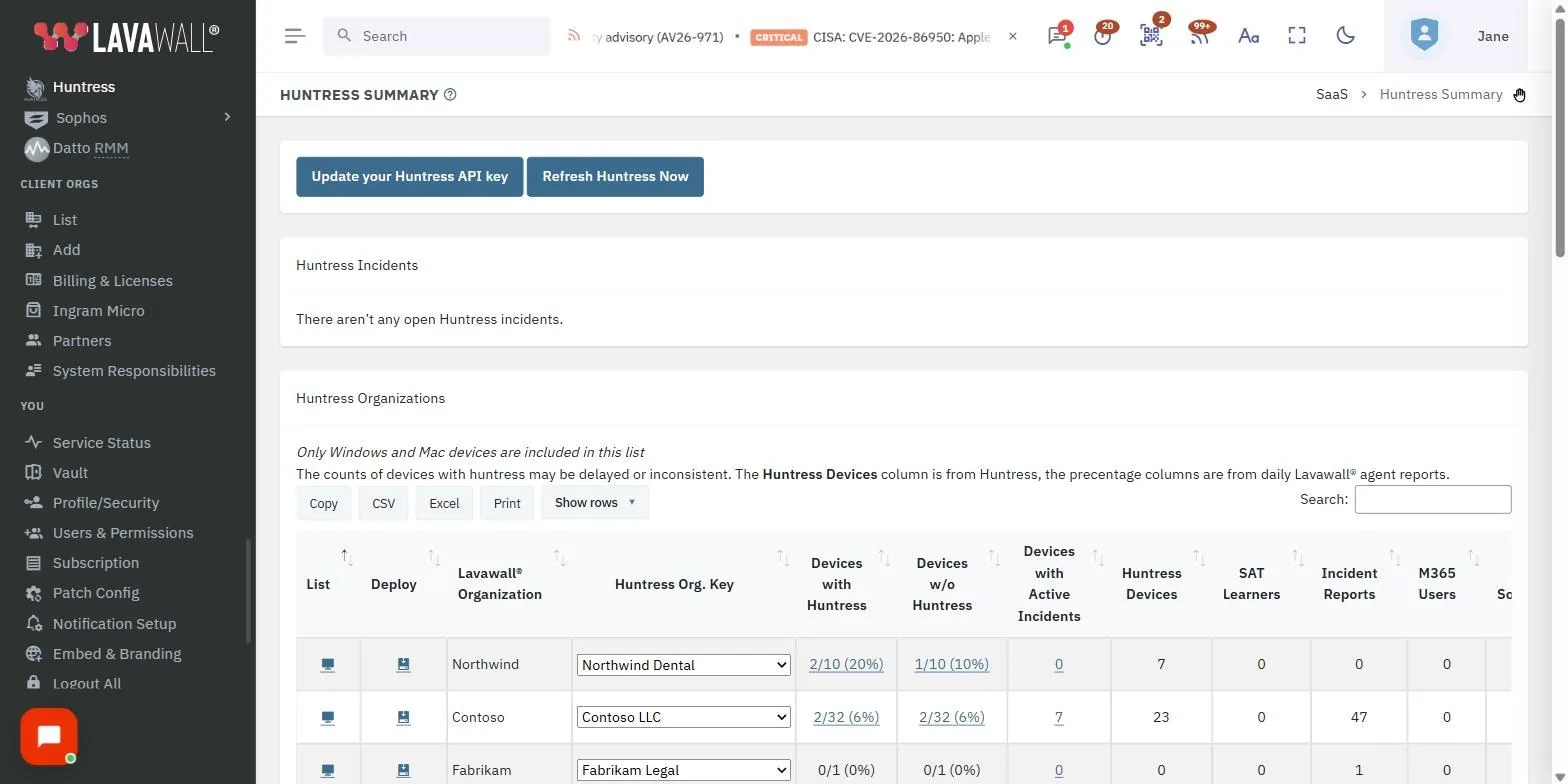
See it in the Lavawall® console
Real screens, shown with example data.
Why pair Huntress with Lavawall®
Huntress is an excellent breach detection and managed threat-hunting platform. Where traditional anti-malware checks recognized threats, Huntress investigates the unknown processes and persistence mechanisms that slip past signatures, so the two approaches complement each other. If you are not already running Huntress, it is worth doing.
The gap most MSPs hit is visibility. Huntress incidents live in the Huntress console, and endpoint, patch, and cloud identity signals often live in other tools again. Lavawall® closes that gap by reading Huntress through its API and presenting the results inside the same multi-tenant RMM console you use to patch and monitor endpoints and to watch Microsoft 365, Google Workspace, and configuration posture.
What the integration correlates and adds
Connect the API once, and Huntress data starts flowing into the panes your technicians already work in.
Automatic organization correlation
Lavawall® uses detected Huntress installations to work out which Huntress organization keys belong to which Lavawall® companies, so incidents land against the right client without manual mapping.
Open incident visibility
A danger indicator marks any system with open Huntress incidents, and a mouseover shows the incident count. Devices with active incidents get a dedicated Huntress tab holding the incident detail.
Installation state at a glance
Under each device's operating system, Lavawall® shows whether Huntress is installed and whether it has active incidents, so you can see coverage and problems together.
Partial-install detection
Macs that are only partially installed (and still need extra permissions granted for Huntress to work properly) are highlighted, so silent coverage gaps do not sit unnoticed.
Company-level summary
The Huntress summary lists open incidents first, then company-by-company statistics, giving you a cross-tenant read on where your attention is needed.
Fleet-wide filtering
Filter devices by Huntress status from the summary or the computer listing to isolate unprotected machines or those carrying open incidents.
Part of unified MDR alerting
Huntress is one signal among several. Lavawall® brings Huntress together with Sophos and Microsoft Defender detections so managed detection and response alerts across your stack arrive in one ranked, de-duplicated queue rather than three separate inboxes. A device with a Huntress incident, a failing configuration control, and a suspicious cloud sign-in shows up as a correlated picture of one client, not as three disconnected tickets.
That correlation is the point. See how Lavawall® folds multiple detection tools into one view on the unified MDR page, and how endpoint hardening feeds the same console through configuration vulnerabilities.
Huntress incidents also appear on the Malware & AV page, beside the detections and protection problems that Microsoft Defender and your other antivirus products report, so every threat on a computer is in one list.
Setting up the Huntress API
The connection takes a couple of minutes and needs only an API Key and API Secret from your Huntress account.
- Log in to huntress.io.
- Open the three-line menu and select API Credentials.
- Generate (or regenerate) your API credentials.
- Record the API Key and the API Secret.
- In the Lavawall® console, click Huntress in the left menu.
- Paste both values and click Update.
From there Lavawall® correlates your Huntress organizations to your companies, surfaces open incidents, and keeps installation status current.
Frequently asked
- Does Lavawall® replace Huntress?
- No. Lavawall® works alongside Huntress. Huntress does the breach detection and managed threat hunting, and Lavawall® pulls its incidents and installation status into your multi-tenant console so Huntress alerts sit next to your endpoint, cloud, and configuration signals instead of in a separate portal.
- What does the Huntress API connection give me?
- Connecting the Huntress API lets Lavawall® automatically correlate Huntress organizations to Lavawall® companies, surface open incidents per device and per company, flag partially-installed Macs that still need permissions granted, and give faster access to Huntress reporting from inside your fleet view.
- How do I set up the Huntress integration?
- In huntress.io, open the three-line menu, choose API Credentials, and generate an API Key and API Secret. Then open the Huntress page in the Lavawall® console left menu, paste both values, and click Update. Lavawall® correlates your organizations from there.
- Can I filter my fleet by Huntress status?
- Yes. From the Huntress summary or the computer listing you can filter devices by Huntress installation state and by whether they have open incidents, so you can quickly find machines that are unprotected or need attention.